Last month I wrote up what every number on the TrackEncoder overlay means. The overlay hasn’t changed. What has changed is everything around it — because a recorder bolted somewhere you can’t reach needs to be operable from somewhere you can.
The phone now lives in the glovebox and I never open it. It runs the session from my pocket, hands me the video over wifi afterwards, and gets itself going again when the car’s power comes back.
Control it from my pocket
There are three ways in, and none of them need the phone in your hand.
Telegram is the one I actually use. One card in the chat, rewritten in place rather than repeated, with the state written into the buttons — so the answer is visible without pressing anything:
- start / stop
- camera and frame rate
- storage, and how much has been written this session
- phone temperature and whether Android has started throttling
- last lap
- the phone’s address, as a button that opens the file browser
It works from anywhere with signal, because the phone dials out rather than waiting to be reached. No port forwarding, no VPN, no knowing what address the car’s hotspot handed out this morning.
A web page on port 8080 does the same, plus the files. Any browser on the same network — a hotspot from either end is enough, and neither needs the internet. Buttons are sized for a gloved thumb, and it’s plain links rather than JavaScript, so it can’t get stuck in a state its own script invented.
The notification shade, for when the phone is already in your hand.
Pull the session onto the laptop over wifi
The card is a microSD in the phone’s SIM tray. That’s deliberate — more on why below — and the obvious downside is that nobody wants to pull a SIM tray in a paddock. So the video comes off over the network instead.
The web page lists everything with sizes and dates. Tick what you want, press one button, and it hands back a command to paste:
curl.exe -C - -o "2026-08-22_1532_CMP_000.mp4" "http://192.168.1.88:8080/dl/2026-08-22_1532_CMP_000.mp4"
curl.exe -C - -o "2026-08-22_1532_CMP.opportunities.txt" "http://192.168.1.88:8080/dl/..."
One line per file, so they come down one after another rather than fighting each other for the same wifi.
Every download resumes. The server answers 206 Partial Content, so a transfer that dies at 80% picks up where it stopped, and re-running the whole block skips whatever already finished. That matters more than convenience when the files are gigabytes, the link is paddock wifi, and the session can’t be recorded a second time.
I looked at zipping the selection instead — one click, nothing to paste. But a zip can’t resume, so one dropped connection costs the entire download. Wrong trade for footage you can’t recreate.
curl.exe rather than curl in the generated command, incidentally, because in PowerShell curl is an alias for Invoke-WebRequest and doesn’t take those flags.
Clearing the card is on the same page, behind a confirmation, and only ever touches files this app wrote — anything else on the card is left alone.
It handles the grid queue by itself
The supply to the phone is switched. I cut power sitting in the grid queue waiting to go out, and that used to be the end of the session.
Now it’s an ordinary pause:
- Power goes. The phone is still very much alive on its own battery, so it closes the file properly and tells Telegram it did.
- Power comes back. It starts recording again on its own, retrying every couple of seconds for forty-five, because the powered hub takes a moment to re-enumerate and bring the camera back with it.
Measured on the bench, the gap from cutting power to recording again was about 16 seconds, most of which was me. Nobody reaches into the glovebox when the car gets waved back out.
This is also why the card sits in the phone’s SIM tray rather than in a reader on the hub. The hub’s supply is the one being switched, and everything downstream of it goes away for a few seconds when that happens. The camera can afford that — it comes back. Storage can’t, because the file being written is the session. In the SIM tray it’s on the phone’s own power rail, where nothing the hub does can reach it.
It won’t record something worthless
Two things now have to be true before it will start, and both are checked wherever you start it from — the screen, the shade, the web page or the bot:
There has to be power. The supply is switched; a session that starts on battery is one that was never meant to be running.
The camera has to be delivering frames. Not “is a camera plugged in” — is it actually producing pictures, within the last two seconds. Those are different questions, and only one of them is worth answering: a status line saying 1920x1080, 30 fps is reporting the last thing the camera announced, which stays true long after it stops sending anything.
There’s a FORCE button in the status row that overrides both, for when the refusal is wrong. It’s off at every launch and deliberately not remembered — an override that survives between sessions is off on the morning you needed it, with nothing on screen to say so.
If it does refuse, it says which: REC: NO POWER or REC: NO CAMERA.
Knowing what the card is doing
Tap CARD in the status row:
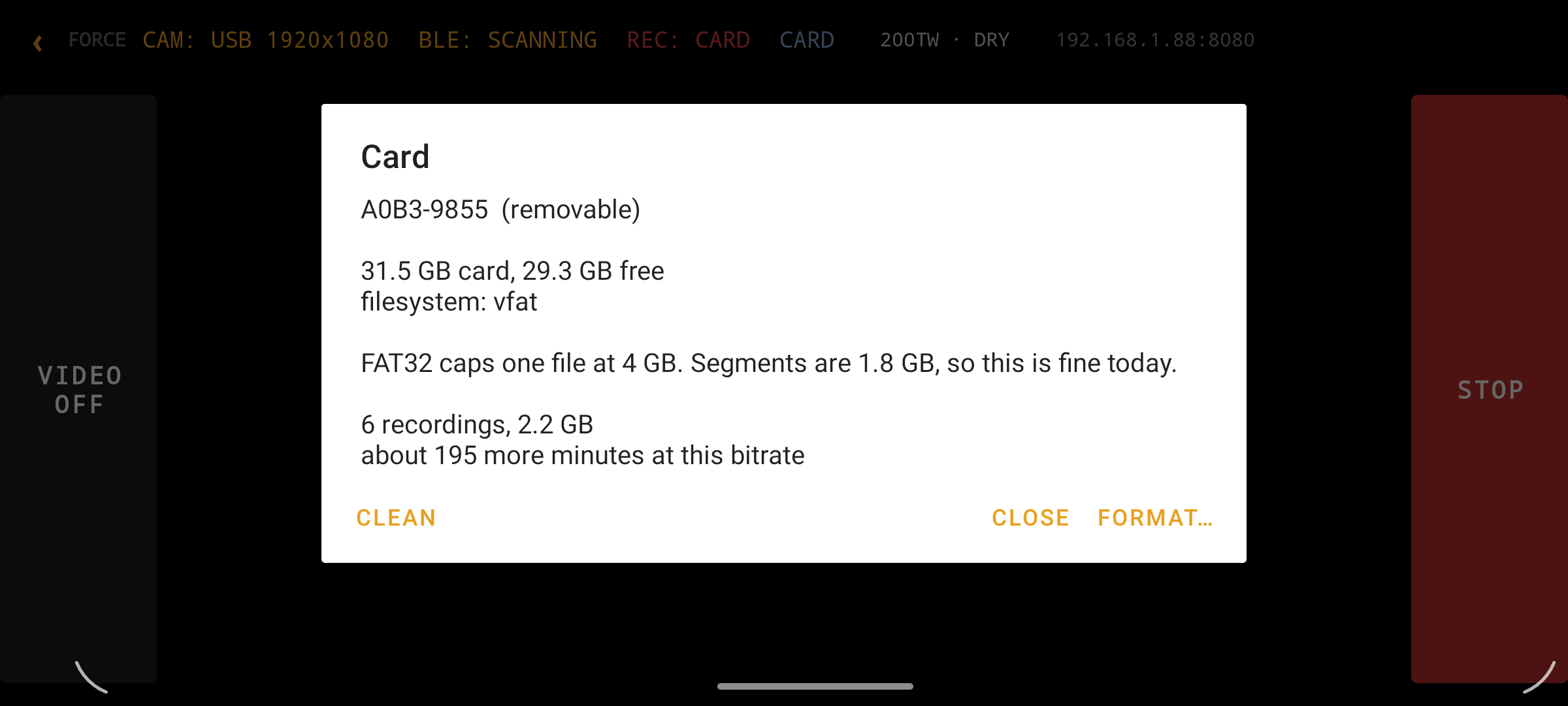 Minutes remaining rather than gigabytes free — when the question is “does this last the session”, one of those actually answers it. The FAT32 note is stated against the real segment size, so it reads as a fact rather than a warning with no consequence.
Clean the card from here, or hand over to Android’s own formatter, which picks exFAT or FAT32 and the right cluster size for whatever card is in the slot. It also warns you before you start that formatting gives the card a new ID, which means re-granting the app access afterwards — better to know that going in.
The phone takes up to a 512 GB card, and its kernel mounts exFAT, so an SDXC card works straight out of the packet with no reformatting. At 20 Mbps a 128 GB card holds about 21 hours, which is a weekend.
Keeping it cool in a glovebox
The screen is the thing that makes heat in a phone nobody is looking at — this one’s an IPS panel, so a lit screen means a lit backlight sitting next to the encoder.
It now puts itself out. The moment a recording is confirmed running, the app blanks the panel and the phone drops to a genuine sleep, holding nothing but the CPU wake lock that keeps the encoder fed. Recording carries straight on. If you turn the preview on to look at something, it leaves the screen alone — that light was asked for.
The battery holds at 80% rather than sitting full and hot all day, using the charge controller that idles the battery and lets the charger carry the load, so the phone runs off the supply instead of running itself down to stay at 80%.
Temperature goes to Telegram — a note when it gets warm, a louder one if it gets genuinely hot, and an all-clear when it comes back down, so a warning never leaves you wondering for the rest of the session.
Where it is
Everything above is on the phone in the car and in the repo. The overlay itself is unchanged from the metrics writeup — same numbers, same layout, same reasoning behind each one. It just gets started, watched, and unloaded without anyone opening the glovebox now.
Next is NCCAR, where I get to find out what the coaching numbers say about my driving rather than about my wiring.