F5X Code
A diagnostics, logging and coding app for the third-generation MINI: the F54 Clubman, F55 five-door, F56 three-door and F57 convertible. It reads every module's fault codes in plain English, logs the engine and gearbox while you drive, and backs up and changes module coding. It runs on an Android phone, connected to the car with an ENET cable (the one E-Sys uses) or the red MHD Wi-Fi adapter. No laptop.
What it does
Three jobs on one connection to the car.
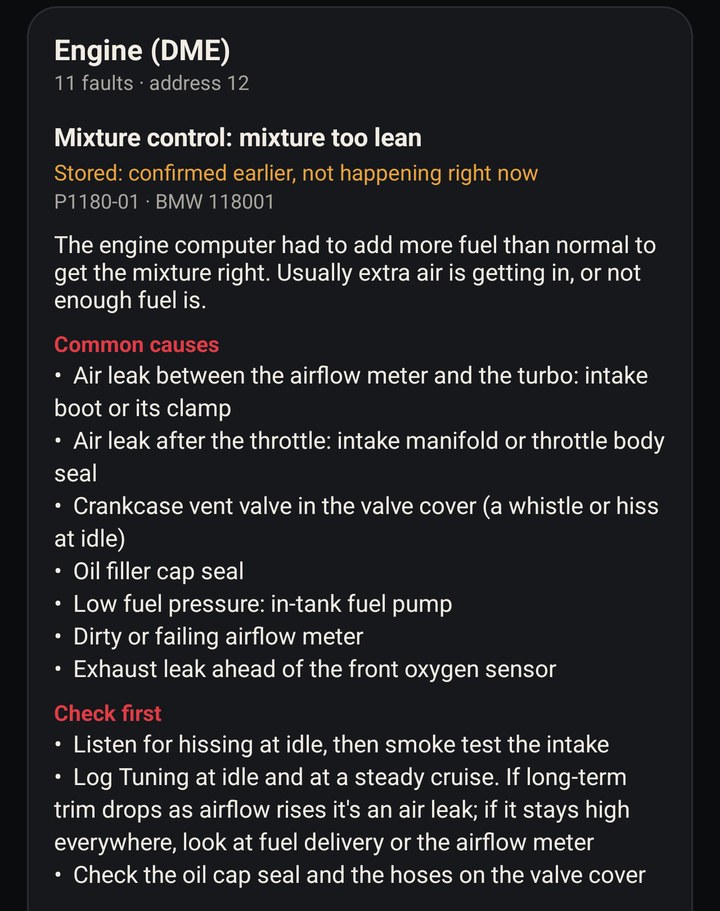
Every module's faults, each with whether it's happening now or stored, whether it lights the dash, what it means and what to check first. Check all fault codes reads every module in one pass. Clear them one module at a time.
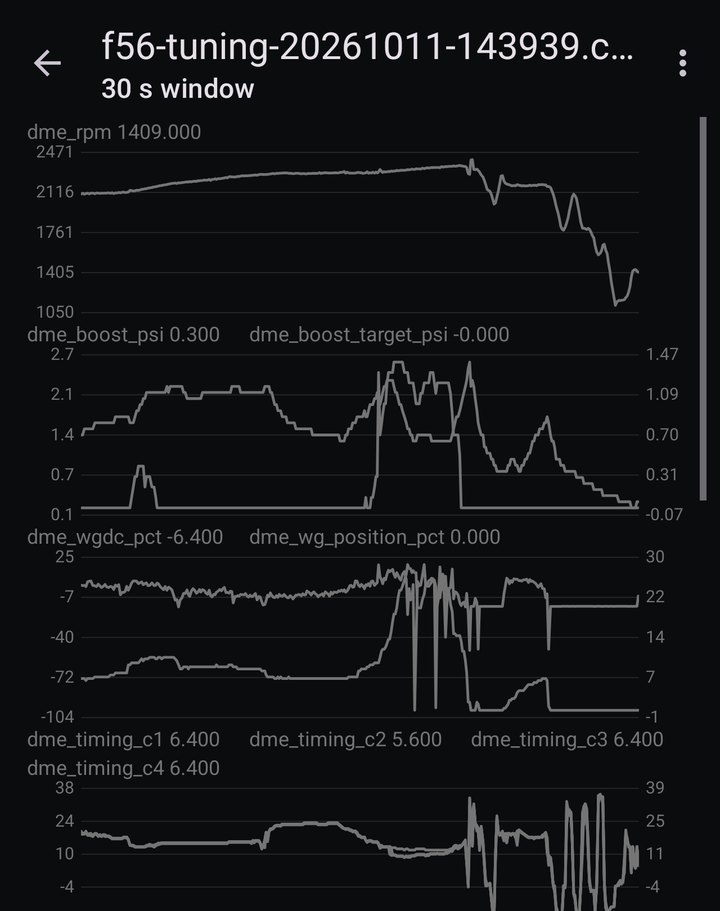
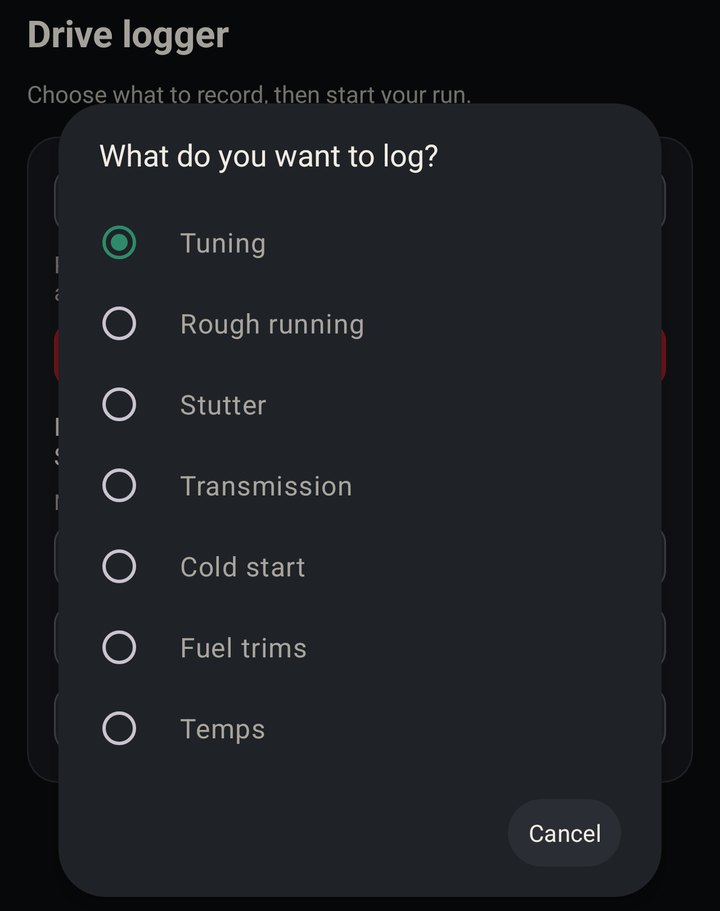
Seven presets for boost and spark, misfires, fuel trims, a cold start and the six-speed automatic. Tap Start logging, drive, and the log opens on graphs made for that job. What it logs.
Back up and change the settings inside eleven modules, every one by name, with the usual changes like true speed as one tap. Each save checks the module, writes, then reads it back to prove it landed. Coding and more.
What it costs
The engine's fault codes are free. Everything else is one $45 purchase in Google Play. No subscription.
The engine's fault codes in plain English: happening now or stored, whether it lights the dash, what it means and where to start looking.
Everything else: every module's fault codes, Check all and clearing codes, oil level, the logger and its graphs, and reading, saving, comparing and restoring coding. Bought once in Google Play.
What you need
An Android phone and one of two ENET connections: an ENET cable with a USB-C Ethernet adapter, or the red MHD Universal Wi-Fi adapter. ENET is the fastest link and what the Tuning preset needs for the DME's full channel set. An OBDLink MX+ or CX is optional.
The OBD-to-Ethernet cable E-Sys uses, usually $15 to $25. Get one that plugs straight into the car's OBD port. A splitter usually leaves out the Ethernet pins, and then the car won't answer. Find one on Amazon.
Plugs into the phone, and the ENET cable plugs into it. Any USB-C to Ethernet (RJ45) adapter works; 100 Mbit is plenty. Some ENET kits come with one. Find one on Amazon.
The wireless choice, or the one to use if you already own it for MHD. It's an ENET bridge over Wi-Fi, so it's as fast as the cable and reads the same DME channels. It plugs into the OBD port and the phone joins its Wi-Fi. No USB adapter or tethering needed.
Android 7 or newer. For the ENET cable, Android 11 or newer, because the cable needs Ethernet tethering, which arrived in Android 11. Look for it under Hotspot and tethering in your phone's settings.
Bluetooth, no cable. Pair it in Android's Bluetooth settings first, then in the app choose Connect, then Paired Bluetooth adapter.
Bluetooth LE, no pairing needed. In the app choose Connect, then OBDLink CX / Bluetooth LE.
Over an OBDLink, fault codes, coding and the gearbox presets all work. The Tuning preset reads the standard OBD channels instead of the DME's full set, and every read is slower than over ENET. Keep the car on a battery charger for coding: a module that restarts partway through a write means low voltage.
Hook up the ENET cable
Five steps, a couple of minutes the first time. Ethernet tethering is the one people miss.
- Plug it in. The ENET cable into the car's OBD port and into the USB-C Ethernet adapter, and the adapter into the phone. If Android asks which app to open, dismiss it.
- Ignition on. The engine can stay off. The adapter's link light comes on once the car's Ethernet wakes up.
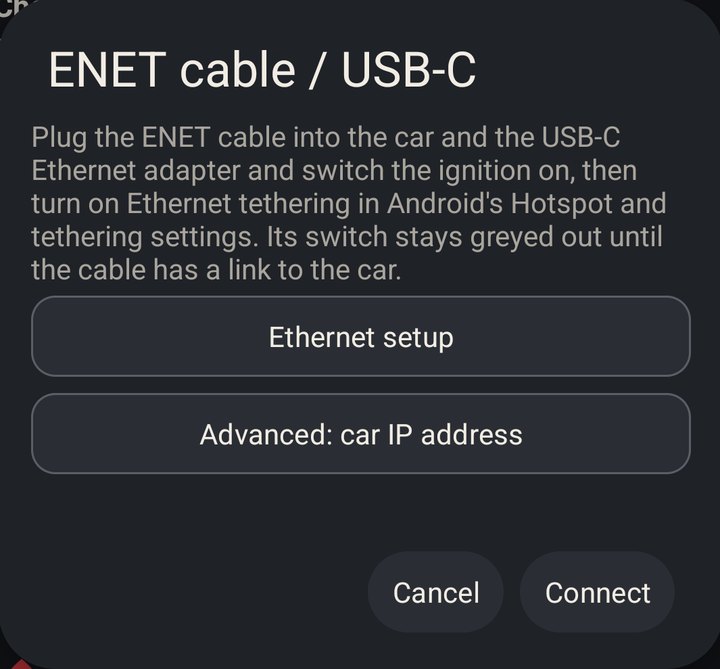
- Turn on Ethernet tethering. On a Pixel it's Settings, Network & internet, Hotspot & tethering, Ethernet tethering. The Ethernet setup button in the app's connection screen opens the same page. The car doesn't hand out network addresses, so the phone has to. The switch stays grey until the cable has a link, so a grey switch means check the cable and the ignition, not the settings.
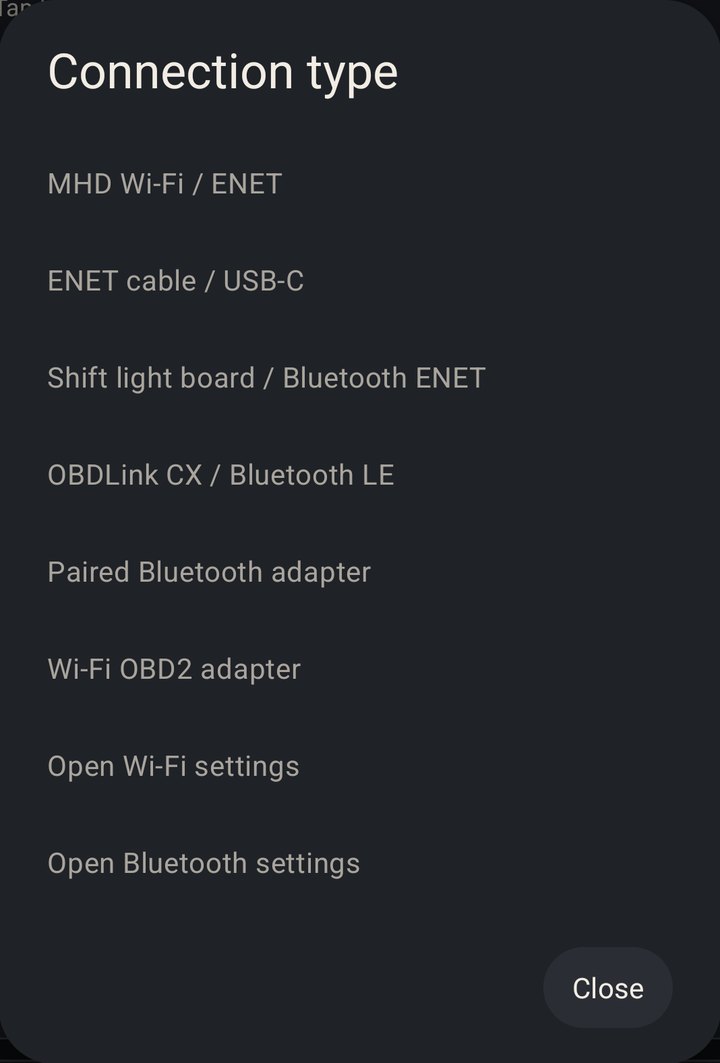
- Connect in the app. Tap Connect at the top of F5X Code, choose ENET cable / USB-C, and tap Connect. Leave the car IP blank; the app finds the car on its own.
- Check it answers. Run Check all fault codes on the Vehicle tab. If anything fails, tap Send to Matt: the report has every connection step in it.
The red MHD adapter instead
- Plug it into the OBD port and switch the ignition on.
- Join its Wi-Fi in Android's Wi-Fi settings.
- Connect in the app. Tap Connect, choose MHD Wi-Fi / ENET, leave the address at 192.168.4.1, and tap Connect.
What it can and can't do
It reads, logs and codes. It doesn't flash or tune.
- Read and clear fault codes on every module, in English.
- Log the engine, misfires and the six-speed automatic, and graph it.
- Read the oil level from the engine's own sensor.
- Back up, change and restore coding on eleven modules, with a signature check and read-back on every save.
- Flash or tune engine software.
- Change coding on module software it hasn't been checked against. Those modules can still be read and backed up. More are added with each update.
- Promise a listed option works on your car. MINI changed these modules many times over the years, and there are far more options than on the older cars. As with NCS Expert, an option showing up doesn't mean your car will accept it.
- Use a K+DCAN USB cable. That's the older BMW cable; on these cars it's ENET or an OBDLink.
- Run on iPhone. Android only.
What it logs
Pick a preset, tap Start logging and drive. Each preset reads what that job needs as fast as the adapter allows, and opens on graphs drawn for it.
RPM, boost and target, wastegate duty and position, MAF, load, timing on each cylinder, pedal, throttle and target, intake and charge air temps, lambda and target, trims, and high and low-side fuel pressure. Over ENET it all comes from the DME in one read a row. A cylinder whose timing drops below the others is the one pulling for knock.
RPM, pedal, throttle, load, MAP, timing, lambda and target and rail pressure every sweep, with trims, MAF, temps and the rear O2 behind them. Misfire counts per cylinder, and RPM falling while the pedal goes down is flagged as a dip.
Engine data alongside the six-speed automatic: engine, turbine and output speed, slip, gear and target gear, converter lockup, solenoid duty, current and pressure, ATF temperature and the torque the gearbox is asked for.
Transmission only, several rows a second: turbine and engine speed, slip and lockup state every row, with gear, solenoid, pedal, output speed and torque in turn. For watching the converter lock, slip and release around a shudder.
From a cold start through a few minutes of idle. Stretches where lambda runs 0.10 leaner than the DME's target are shaded, next to the DME's own misfire counters, rough running per cylinder, rail pressure against target and low-side pressure.
Short, long and total trim, MAF, load, lambda and purge flow. A minute at idle and a minute at 2,500 rpm tells a vacuum leak from a fuel delivery problem.
Coolant, oil, intake, ambient and cat temperature, module voltage, run time and fuel level, one row a second, so a long drive stays a small file.
The graphs
- Replay any log on one time axis, pinch to zoom, and read every channel at the point you tap.
- Lambda as AFR by default, with fuel cut shaded and lean stretches you can jump between.
- Marks. Tap Mark when the car does the thing, and the mark is on every chart.
- Rough running, all cylinders: each cylinder's misfire increases with RPM, load, boost and rail pressure underneath.
- Screen off. Recording carries on with the phone locked, with Mark and Stop on the notification.
- Share any log as CSV to Drive, Files or a message, or send it to me from the app.
Coding and more
Fault codes, oil level and module coding, on the same connection as the logger.
Oil level
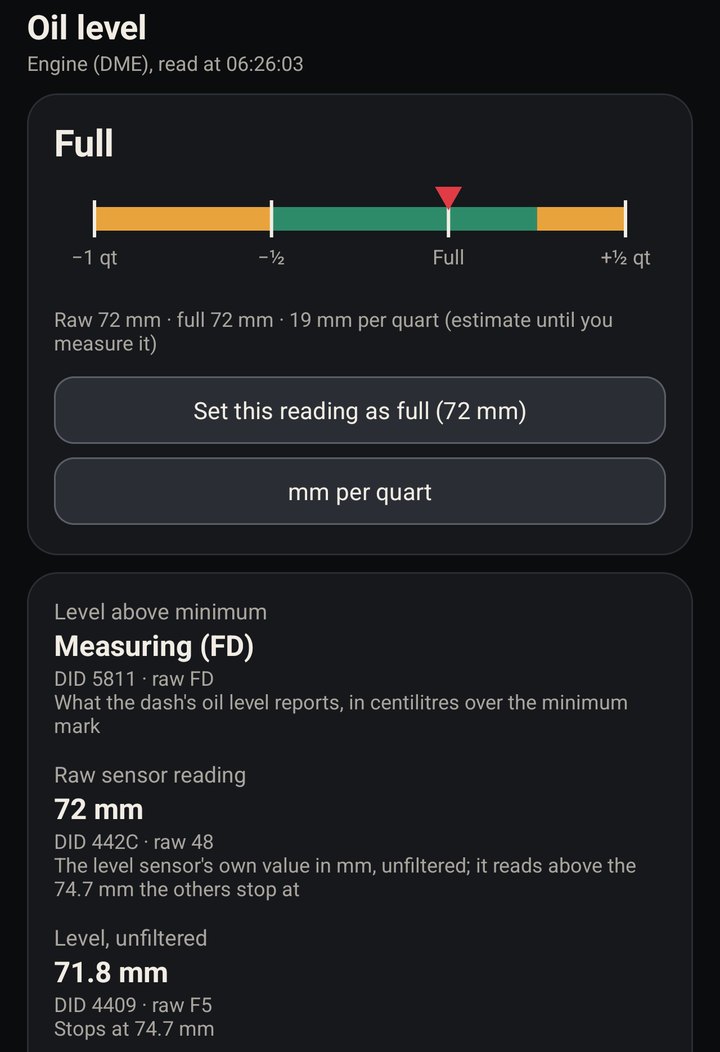
These cars have no dipstick. The app reads the engine's own oil level sensor: the dash's figure, the raw sensor reading in mm, the short and long-term averages, oil temperature and pressure, each with the byte it came from.
The gauge runs from a quart low to half a quart over. Set your own full mark once, idling warm on level ground with the oil at full, and every reading after that shows how far off full you are. The dash's figure reads Measuring for a while after an oil change; the raw reading doesn't wait.
Quick codings
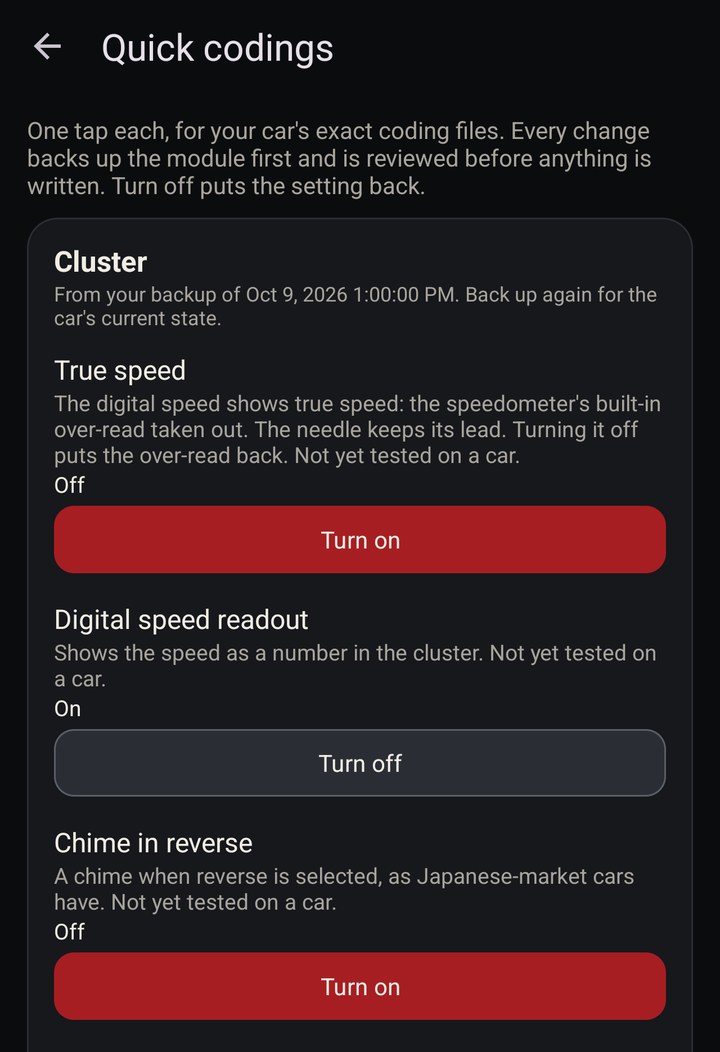
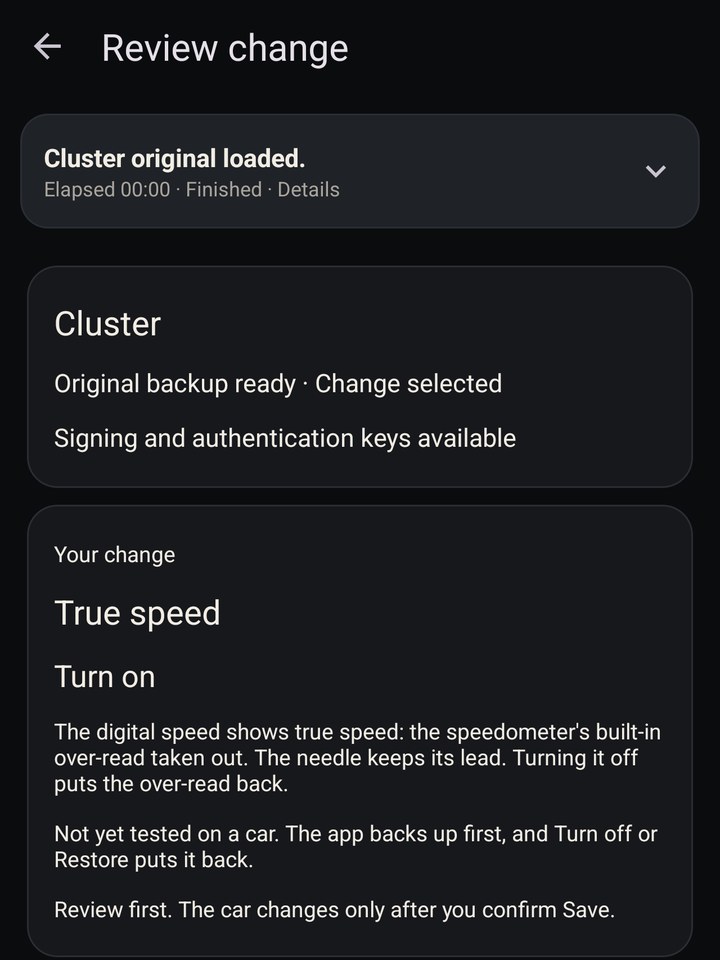
The usual changes as one-tap buttons, each one shown on or off from your latest backup. A tap opens the module's review: it backs the module up, shows what will change, asks before writing, then reads it back. Turn off puts the setting back.
- Instrument cluster: true speed, digital speed readout, chime in reverse, auto start/stop status.
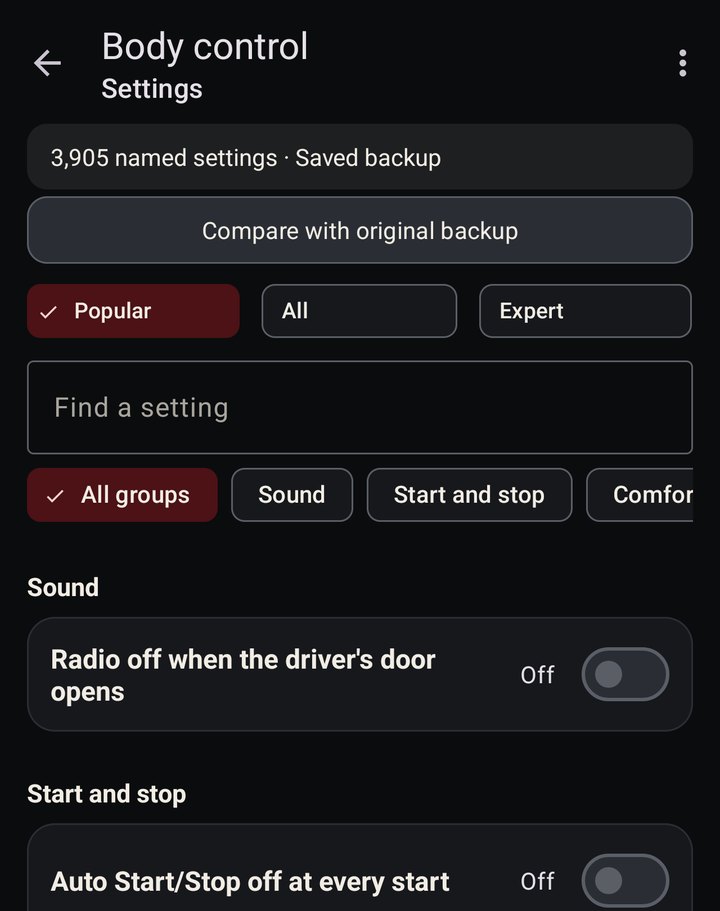
- Body module: auto start/stop remembers its setting, or starts every drive off; radio stays on when the door opens; hazards flash under hard braking.
- Head unit: skip the legal notices, tyre pressures and temperatures.
True speed takes the speedometer's built-in over-read out of the digital readout. The needle keeps its lead. Each quick coding is tied to the exact coding file it was built from, so on a module running other software the app says it doesn't apply and leaves it alone. The app also says which ones haven't been tried on a car yet.
Track settings
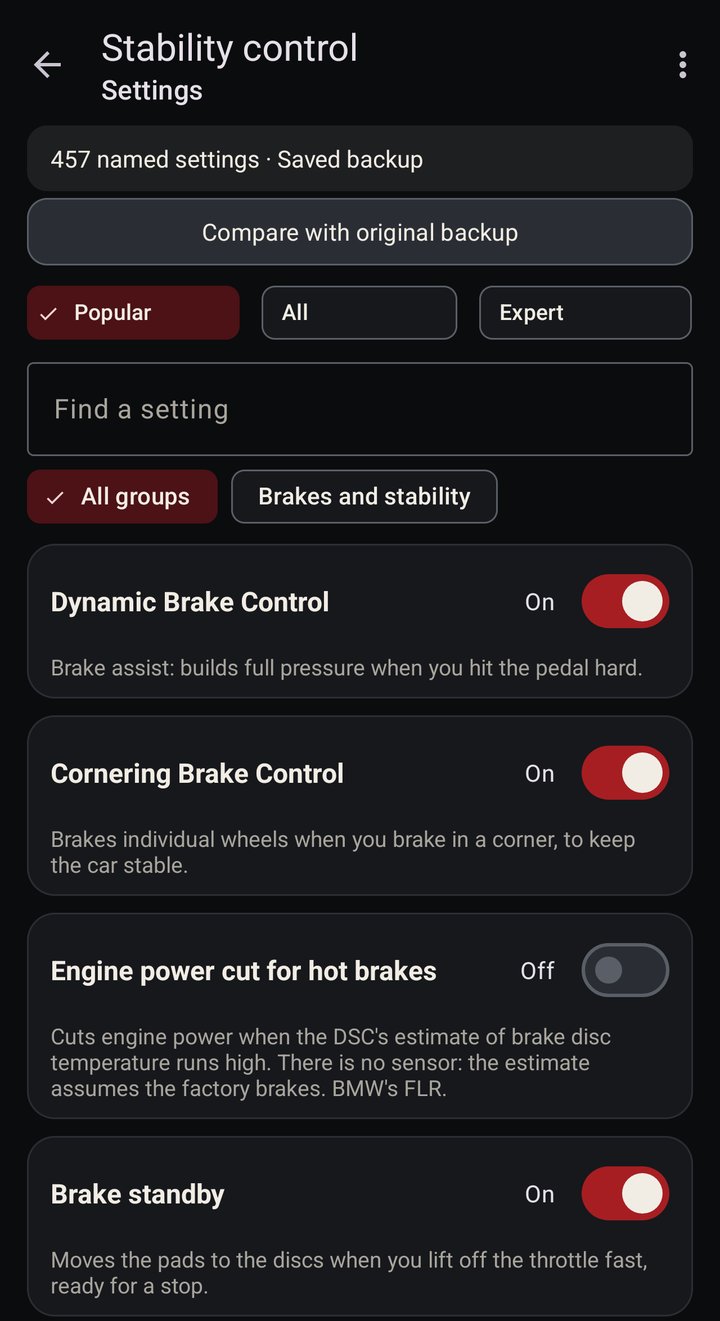
BMWs of the E82 and E90 era keep a set of helpers running in the stability control module even with DSC and DTC switched off. On those cars, track drivers code them out with NCS Expert, and paradoxical3's guide on e90post is the usual list. The F56's stability control has the same functions under the same BMW names, and each one is a switch in the app.
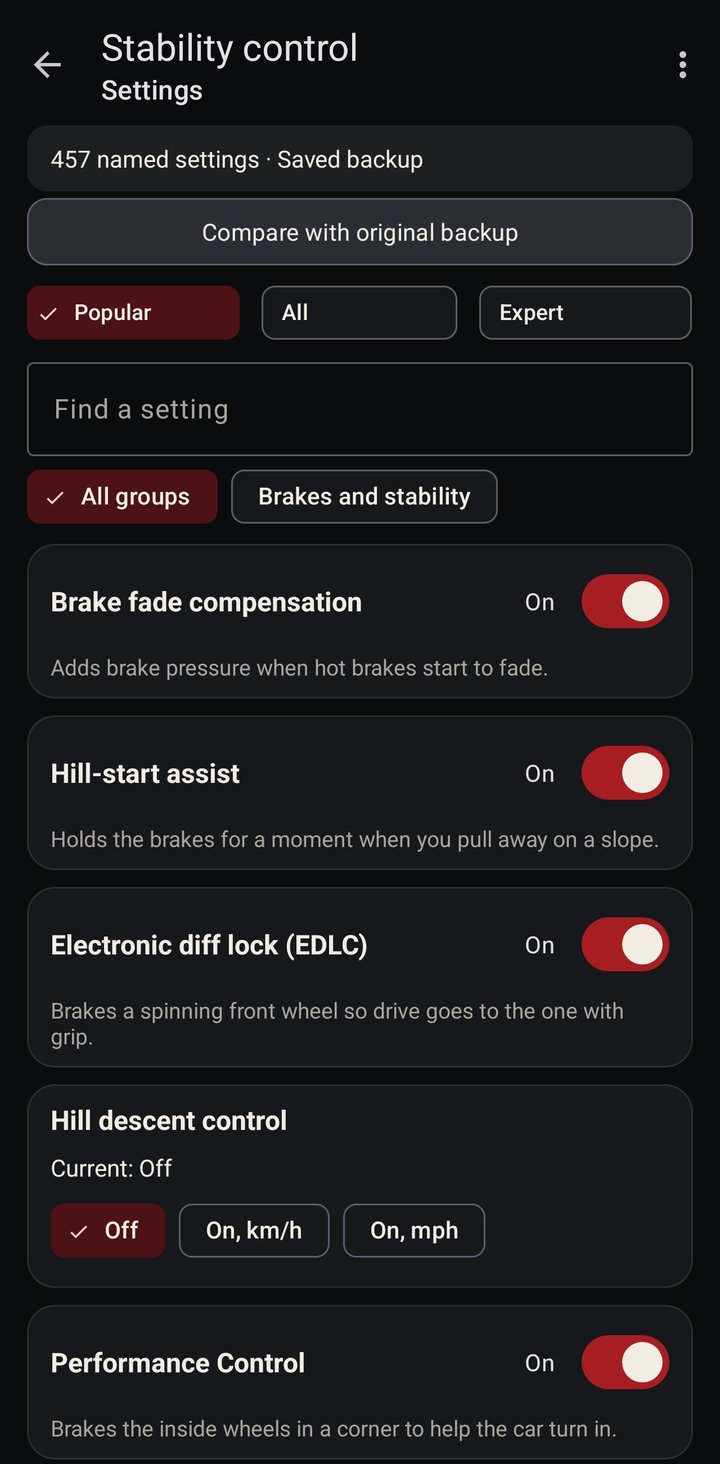
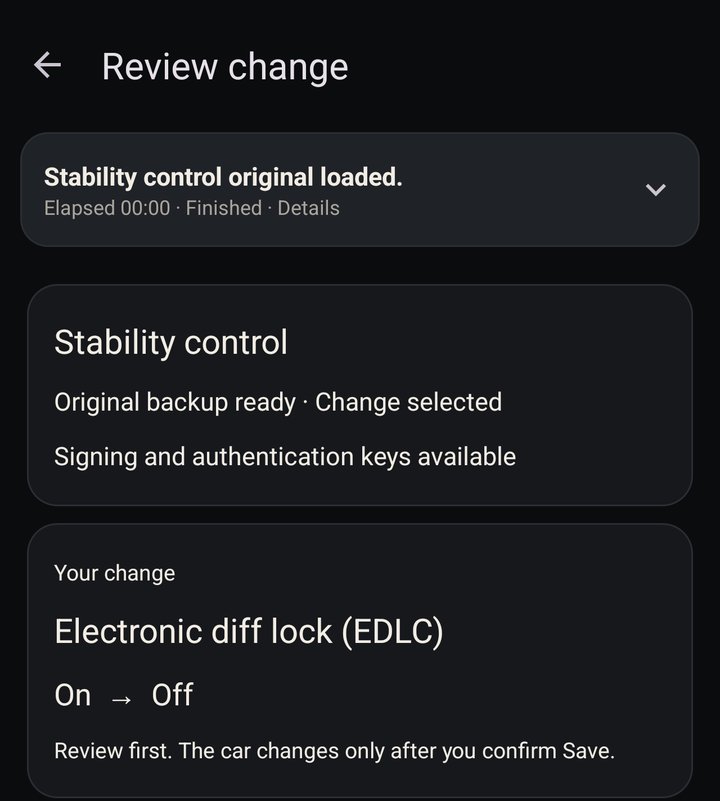
- Electronic diff lock (EDLC): the e-diff. It brakes a spinning front wheel to push drive to the other. With a mechanical limited slip diff it fights the diff, so turn it off. On an open diff it's what stops the inside wheel spinning up, so leave it on.
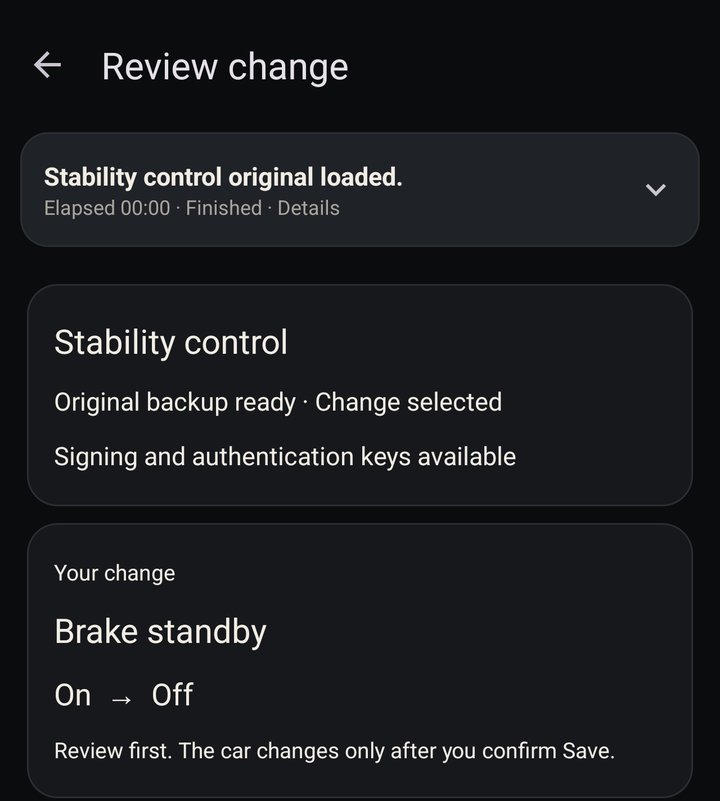
- Brake standby: moves the pads to the discs when you lift off the throttle fast, then backs them off if you don't brake in time. On track that reads as a pedal that changes from corner to corner. EVB on the E9x.
- Brake fade compensation: adds pressure as its estimate of brake temperature climbs, so the pedal changes through a session. HPS on the E9x.
- Dynamic Brake Control: BMW's brake assist, HBA on the E9x. It treats a hard stop as an emergency and builds pressure up to ABS.
- Engine power cut for hot brakes: FLR. It cuts power when the module's estimate of disc temperature runs high. There's no sensor behind it, and the estimate assumes factory brakes. It's already off on the car in these screenshots.
- Performance Control: brakes the inside wheels to help the car turn in, the F56's version of Dynamic Performance Control (FDB).
The guide's Maximum Brake Support (HVV) has no switch on the F56. Each of the others is one change: open Stability control's settings, flip the switch, check the review and save to the car. The app backs the module up first and reads it back after, and the original backup puts everything back for the street.
Every module's faults, each with whether it's happening now or stored, whether it lights the dash, what it means, the likely causes and what to check first. Check all fault codes reads every module in one pass, so a check engine light can't hide in a module you didn't pick. Clear them one module at a time.
Every setting in a module by name, in Popular, All and Expert views. A backup is saved before anything changes, and backups export and import between phones.
Pick a setting, choose the value, review it and save to the car. Each save checks the module's identity and signature, writes, then reads it back to prove it landed.
Compare any backup with your original, setting by setting, and see every save, restore and check you've made. Restore the original the same way it was saved.
Back up the body module in any state and put a saved backup back unchanged, for a module left half-written by an interrupted session.
Coding covers eleven modules: airbag, engine, transmission, stability control, steering, active sound, body, instrument cluster, head unit, controller and climate. The option lists are big. The body module alone has 3,905 named settings, and MINI changed these modules many times over the years, so an option listed for one software version can be ignored or refused by another. As with NCS Expert, seeing an option doesn't mean your car will take it. Every save is read back, so you know whether it landed.
Get it
It's in Google Play closed testing, so it won't show up in a Play search yet. Three steps, all with the Google account on your phone.
Opt in on Play
Tap Become a tester. Google can take about ten minutes to let a new group member in.
Become a testerScreenshots are the app on this F56's own data: its fault scan, oil level reads, a drive log and its module backups, played back from the car's recorded replies with the VIN hidden.
No account, no ads, no analytics. Everything stays on your phone unless you send a report. Privacy policy.