What this app does
Trackday Pyrometer Helper is my one-screen-per-job track app: tire temps from my PyroTC BLE pyrometer, hot/cold pressures from cheap BLE TPMS sensors (Zeepin and DJTPMS), an all-day background pressure monitor, per-tire heat-cycle tracking, corner balance with ProForm wireless scales, and packing checklists. Everything is on-device — no accounts, no cloud.
This is the manual I wish I’d written earlier. It’s ordered the way you’d actually set the app up, top to bottom.
What you need
Only the phone is required — everything else is optional, added as you need it.
- An Android phone with Bluetooth LE. That’s the whole app.
- A PyroTC handheld pyrometer (optional) — my 3D-printed K-type gun. It’s what measures tire temps; skip it and you only lose the pyrometer sessions, while pressures, the background monitor, corner balance, and checklists all still work.
- BLE TPMS sensors, one per corner — cheap Zeepin / TPMSII or DJTPMS valve-stem units (you can mix brands). These give hot/cold pressures and the background monitor.
- Posca PC-3M paint markers — the color system that ties sensors to corners is built around a 14-marker kit. Optional, but it’s how rotations stay painless.
- ProForm wireless corner-scale pads (×4) — only if you want live corner balancing. Manual weight entry works without them.
Before anything: Bluetooth & permissions
Every device the app talks to — the PyroTC gun, the TPMS sensors, and the ProForm scale pads — is Bluetooth Low Energy. There’s nothing to pair in Android’s system Bluetooth settings and nothing to “connect” there; the app finds and talks to each device directly. Turn Bluetooth on, and on first launch grant what Android asks for:
- Nearby devices (Android 12+) — this is the one that matters. It covers scanning and connecting to every BLE device. The app declares its scan as never for location, so it does not use or need your location to find sensors. On Android 11 and older there’s no “Nearby devices” — those phones fall back to the old model and need Location turned on for BLE scanning instead.
- Location (optional, separate) — used only for two conveniences: the AMBIENT weather lookup and the ⌖ NEAREST track auto-fill. It reads your last-known location, never live GPS. Deny it and everything else still works; you just type the ambient temp and track name yourself.
- Notifications (Android 13+) — the background monitor runs as a foreground service with a persistent notification; deny this and MON can’t post to the status bar.
- Battery optimization — set the app to Unrestricted (Settings → Apps → Trackday Pyrometer Helper → Battery) so Android doesn’t kill the monitor during a long day in the paddock.
If a permission gets permanently denied, re-asking silently does nothing — the app’s “permission denied” messages link straight to its system settings page so you can flip it back on. And if a device won’t show up later, start here before assuming the hardware died (see Troubleshooting).
Car profiles
Everything in the app is scoped to a car. The CAR dropdown at the top switches between profiles, and each one keeps its own corner weights, scale calibration, static camber, tire targets, and tire-temp sessions.
- New car adds a profile (it seeds as “Car N” — rename it).
- Rename and Delete are in the same dropdown; Reset wipes one car’s data without deleting the profile.
Set your car up once and forget the dropdown exists — unless you run more than one, in which case switching is a single tap and nothing bleeds between them.
The main screen
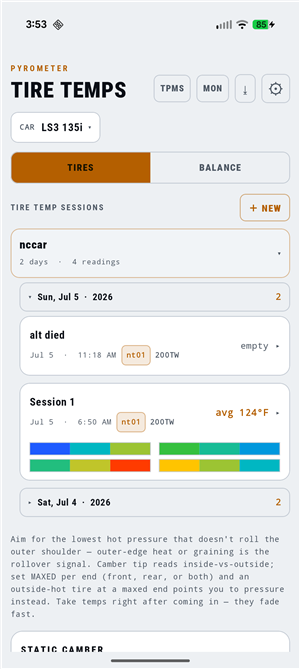 The TIRES tab: session log grouped by track and day, static camber at the bottom.
The header has four buttons: TPMS (sensor setup), MON (background monitor), ⇣ (CSV export of everything), and ⚙ (settings). The TIRES / BALANCE tabs switch between pyrometer work and corner-weighting. A small ● MON indicator lights when the background monitor is running.
The PyroTC handheld
 The gun owns all twelve readings and streams them to the app over BLE.
The pyrometer is optional — it only drives the tire-temp sessions, and the rest of the app runs fine without it. If you do use one, here’s how it works.
The PyroTC gun is standalone — it holds all twelve readings (four corners × OUT / MID / IN) and only hands them to the phone when you sync. It reads in °F, and the battery glyph up top turns green with a bolt when it’s charging.
- SELECT screen — four corner tiles (LF / RF / LR / RR), each showing how many of its three readings are filled (
0/3…3/3; amber while partial, green when full). Tap a corner to open it. - RECORD screen — the live probe temperature big in the middle, the three O / M / I slots above, and a rim of buttons:
- RECORD captures the live temp into the next empty slot (O → M → I) with one short beep. Two quick beeps mean no valid reading (probe fault) or the tire’s already full.
- Tap a filled slot to clear just that one reading; CLEAR wipes all three for the tire.
- BACK returns to SELECT.
- WAKE (optional) fires a 10-second 125 kHz coil burst — hold the gun’s coil at the valve stem to wake a Continental/Tesla-style LF sensor. It’s a niche extra: the aftermarket Zeepin/DJTPMS sensors this app uses instead wake by rolling the car, so most users never touch this button.
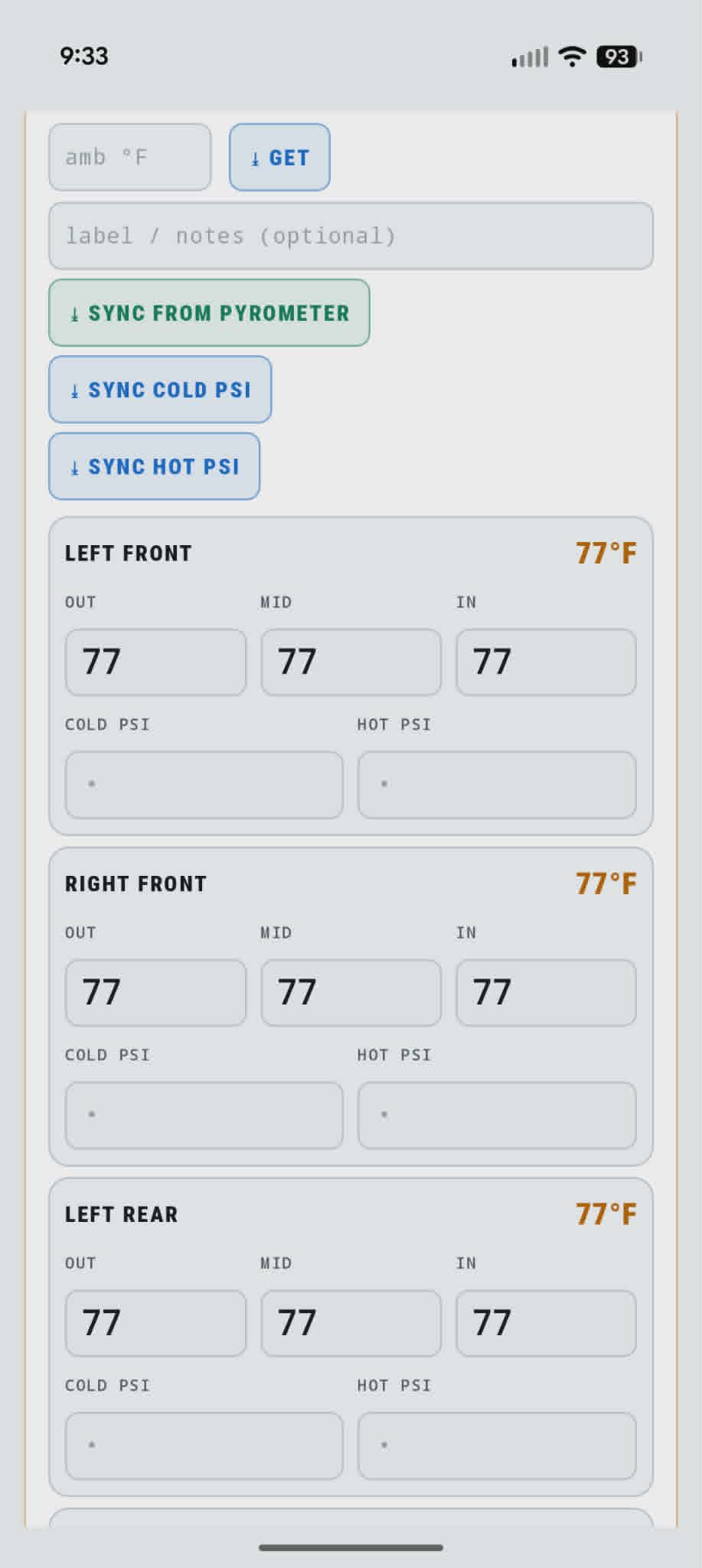
Take temps the instant the car comes in — they fade fast. Record OUT → MID → IN on each corner, then hit SYNC FROM PYROMETER in the app and all twelve cells fill over BLE.
First-time setup: TPMS colors
Everything pressure-related hangs off one idea: paint each valve stem a color (I use Posca PC-3M markers — the app’s 14-color list matches the marker kit: red, orange, yellow, lime, green, teal, blue, purple, orchid, pink, white, black, brown, gray) and teach the app two things:
- SENSORS — which color is which sensor. Tap ⇣ SCAN, roll the car a few feet so the sensors wake, then tap a color chip and tap its sensor in the DISCOVERED list. Do this once per sensor, ever — the brand (Zeepin vs DJTPMS) is auto-detected when you bind.
- WHEELS — which color is on each corner right now. Tap a corner, pick a color.
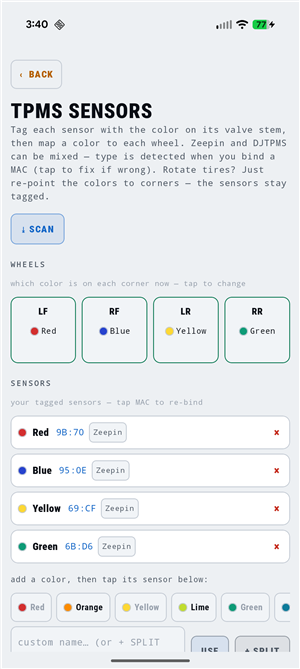 Wheel map on top, tagged sensor library below. Zeepin and DJTPMS sensors can be mixed — the type is auto-detected when you bind.
Two-tone stems (my spare is half red, half white) get the SPLIT button: pick two colors and the app builds a “Red/White” label with a split swatch.
These aftermarket sensors only broadcast while the wheels are rolling or just stopped — if SCAN finds nothing, roll the car a few feet and scan again.
When you rotate tires, WHEELS is the only screen you touch — re-point the colors to their new corners, or save layouts as named SETS and load one with a tap. Every other feature resolves corner → color → sensor at the moment it’s needed, so rotations propagate everywhere automatically.
Tire inventory and heat cycles
Settings → Tire inventory (there’s an ADD ON TPMS › shortcut to the sensor screen from here too). Each physical tire is its own record with a heat-cycle count and corner history.
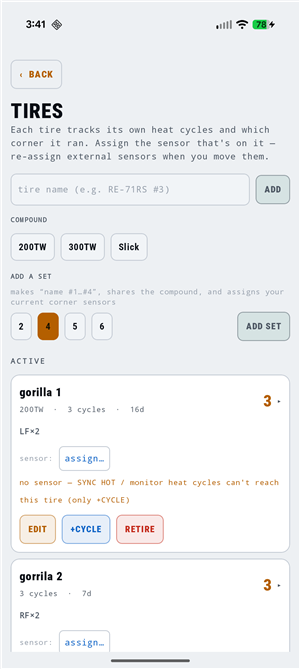 ADD SET creates a whole numbered set in one tap and binds your current corner sensors to it.
- ADD SET — type a base name, pick a compound and count; “sm7.5 #1…#4” are created and each gets the sensor currently on its corner, so cycles start counting immediately. ADD makes a single tire; EDIT changes a tire’s name/compound.
- Heat cycles log themselves three ways: the background monitor detects a heat-up/cool-down on track, SYNC HOT after a session, or the manual +CYCLE button. The two automatic paths dedupe to one cycle per 10 minutes so a single session isn’t double-counted; +CYCLE is never deduped, so tap it N times to back-fill N known cycles.
- The corner is recorded per cycle, so a tire’s history reads like
LF×4 RF×2— rotations captured for free. - RETIRE keeps history and frees the sensor; UNRETIRE brings a tire back (re-assign it a sensor); DELETE removes it entirely. Everything destructive asks first.
If a tire shows an amber “no sensor” warning, the automatic cycle paths can’t reach it — only +CYCLE will log to it until you assign its sensor.
Recording a tire-temp session
Tap + NEW on the TIRES tab. The new session inherits everything from the last one (tire, unit, location, toggles), auto-numbers itself within the day, and — if the tires in your inventory are sensor-bound — names the tire set automatically.
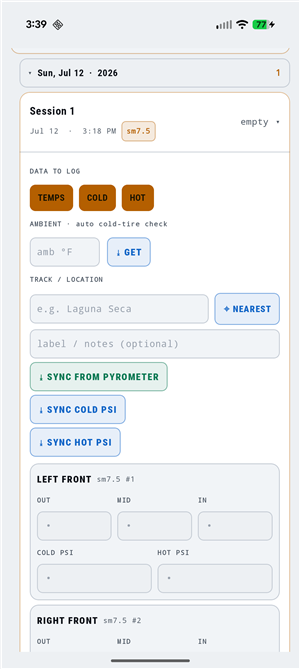 Each corner block shows which physical tire is on it (sm7.5 #1, #2…), resolved live through the sensor chain.
DATA TO LOG lets you pick which columns a session keeps — TEMPS, COLD psi, HOT psi, BLEED — so a quick temps-only session doesn’t nag you for pressures. My usual flow:
- AMBIENT ⇣ GET — pulls local temperature (Open-Meteo) so the app can verify the tires are actually cold.
- ⌖ NEAREST — auto-fills the track from a bundled offline list of ~1,900 circuits (works with no signal; paddocks rarely have any), with an OpenStreetMap fallback when you’re online.
- SYNC COLD PSI — one tap grabs every corner’s TPMS reading.
- Run the session.
- SYNC FROM PYROMETER — record OUT/MID/IN on the PyroTC gun, hit sync, all twelve cells fill over BLE. Take temps immediately — they fade fast.
- SYNC HOT PSI — hot pressures land per corner, and a heat cycle is logged on each tire that reported.
The tire selector near the bottom of the card picks the set, not a corner — one name (“sm7.5”) for the whole session. +NEW fills it from whatever set is mounted; if it’s blank, tap the set chip. You never pick #1/#2/#3/#4 here — the per-corner identity already shows in each reading block’s header.
Set a HOT TARGET for that set once and the app derives the rest: the bleed amount (“bleed 1.5 → 32 psi”) and a predicted COLD START pressure computed from your own measured cold→hot rise — ambient-aware, so a cold morning’s +6 psi doesn’t pollute a hot afternoon’s prediction. Until there’s history it assumes ~3 psi and refines as you log. There’s no cold target to type — COLD START is the derived number.
The collapsible RECOMMENDATIONS section reads the temp spread per tire: inside-vs-outside (the camber gradient) drives camber advice, center-vs-edges drives pressure advice. STATIC CAMBER per corner lives at the bottom of the card; flag a corner MAXED when you’re out of adjustment and the advice stops telling you to add more. DELETE SESSION (confirmed) is there too.
Background pressure monitor (MON)
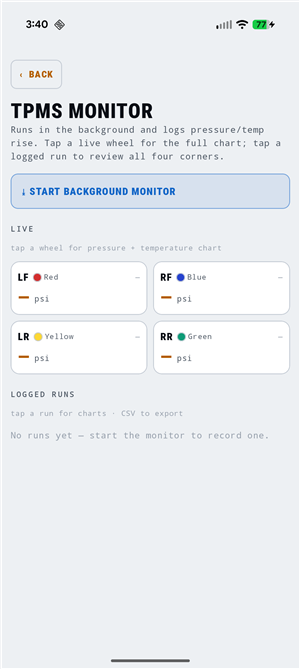 Live corner cards with the wheel-map color tags; logged runs below.
⤓ START BACKGROUND MONITOR runs a foreground service that logs every corner’s pressure and temperature all day, even with the app closed. It samples about every 15 seconds, or sooner on a meaningful pressure change. I switch it on in the paddock while the tires are cold and stop it (● MONITORING — TAP TO STOP, or the notification’s Stop action) at the end of the day.
- Tap a live wheel → CHART › for that corner’s full pressure + temperature chart; tap a logged run for all four corners. Charts have a real elapsed-time axis with min/max marked.
- Every run can be exported to CSV from the LOGGED RUNS list.
- It’s also the heat-cycle auto-detector: a corner that climbs 20°F over its baseline then falls back 15°F from its peak counts one cycle on whatever tire is there.
The notification shows per-corner psi/°F and last-seen age. It’s a monitor and logger only — no alarms, by design. Off by default because it costs battery; if you run it all day, set the app Unrestricted in battery settings.
Corner balance
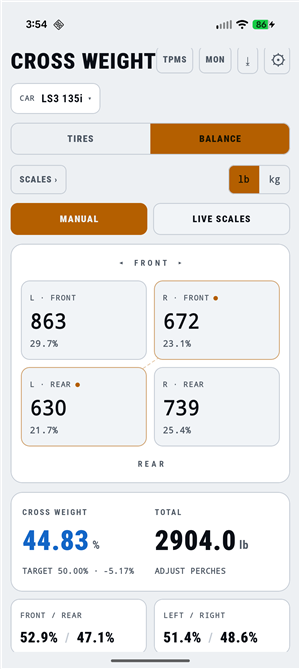 Cross weight with the RF+LR diagonal highlighted. MANUAL entry or LIVE SCALES.
The BALANCE tab computes cross weight (RF+LR as a percentage of total, targeting 50%) from four corner weights — typed in under MANUAL, or streamed live under LIVE SCALES from ProForm wireless pads over BLE.
- The recommendation card tells you exactly how much weight to move onto or off the RF+LR diagonal, which corners to raise or lower, and — once you calibrate lb-per-turn — a TURN ESTIMATE. It reads ● DIALED IN when cross is within a quarter percent of 50.
Scale pads over Bluetooth
SCALES › opens pad setup. The pads sleep to save battery, so they show asleep until you wake them — the live LOG at the bottom shows the wake handshake and each pad’s MAC, so you can see exactly what’s connecting (or not).
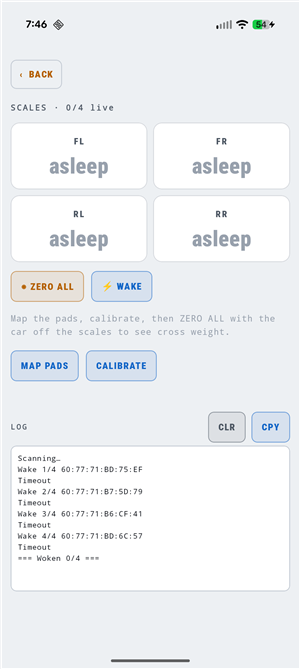 The SCALES screen — four pad cells, ◉ ZERO ALL / ⚡ WAKE, and a live BLE log. “asleep” means a pad is heard but not yet woken.
MAP PADS — ▶ AUTO-STEP walks you FL → FR → RR → RL and binds whichever pad’s raw count jumps when you step on it; or tap a corner on a pad to assign it manually. The map persists until you change it.
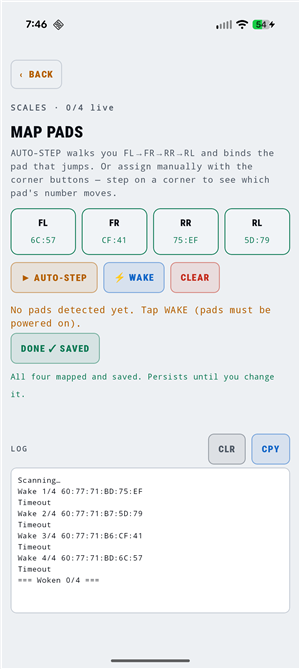 Each corner bound to a pad by MAC. AUTO-STEP does this by having you stand on one wheel at a time.
CALIBRATE each pad once against a known weight: TARE it empty, set the weight on, type the pounds, SET. It stores counts-per-lb per pad (they differ), and RESET ALL CALS starts over.
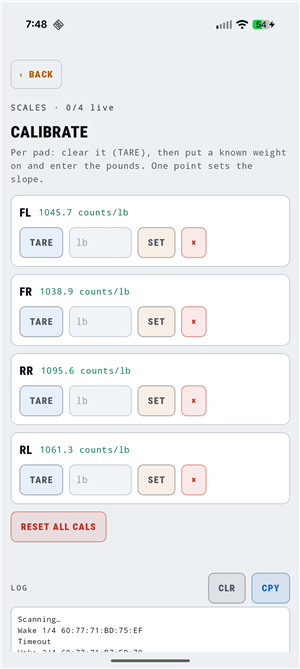 One point per pad sets the slope — my four load cells read 1039–1096 counts/lb.
◉ ZERO ALL with the car off the pads, then roll it on. Back on the BALANCE tab, LIVE SCALES streams the pads in real time with a n/4 live counter; ⇣ CAPTURE freezes the reading into the car and drops back to MANUAL so the numbers hold while you turn perches.
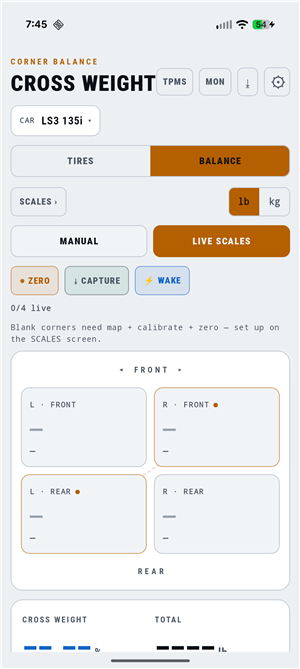 LIVE SCALES mode — ◉ ZERO, ⇣ CAPTURE, ⚡ WAKE, and the live count. Blank corners just need map + calibrate + zero first.
Weigh in race trim: driver weight in the seat, fuel set, ride heights where you want them.
Packing checklists
Reach them from Settings → Packing checklists. A checklist in the app is a reusable template, not a to-do you burn once. Build one — or start from a preset (Day Drive, Tow, Camp) — then check items off as you load the trailer. The checkmarks are just state sitting on top of the list; the list itself stays put.
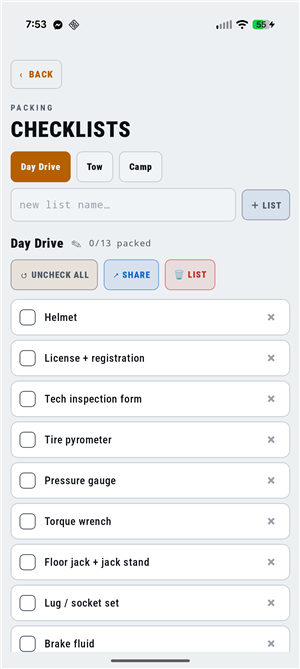 Tabs across the top switch lists; tap a row to check it, ✕ to remove it. The Day Drive preset ships ready to use.
- ↺ UNCHECK ALL clears every checkmark in one tap so the same list is ready for the next event. You never rebuild it, you reset it.
- Add, rename (✎), or remove items and whole lists; the changes stick for next time. Deleting a list (only when you have more than one) confirms first.
- ↗ SHARE sends the list as plain text to Google Keep or any notes app if you’d rather tick it off outside the app. That’s one-way — the actual checking happens here.
- Lists are stored on the device and ride along in the JSON backup, so they survive a phone swap.
Settings & backup
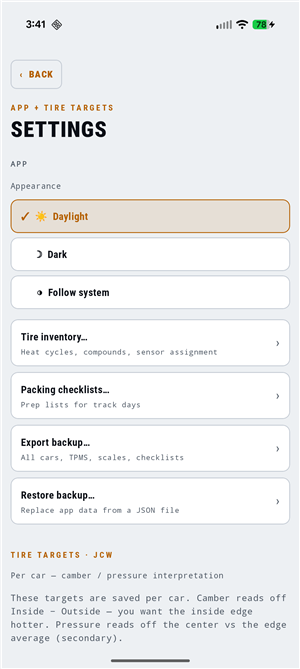 App-wide items on top; per-car tire interpretation targets below.
- Theme — Daylight (default, built for direct sun), Dark, or follow the system.
- Tire inventory and Packing checklists open from here.
- Exports — the ⇣ button in the header dumps everything (one row per tire per session, across all cars: pressures, bleed, temps, ambient, camber, notes) to CSV. The monitor’s LOGGED RUNS export each run on its own. Both are separate from the JSON backup below and go out through the Android share sheet, so they land straight in email, Drive, or Sheets.
- Backup — one JSON file with every car, scale calibration, TPMS set, tire, and checklist. Export before phone swaps; restore replaces everything. It’s the durable path independent of Android’s own auto-backup. Monitor logs aren’t included — export those runs to CSV if you want to keep them.
- Tire targets — the per-car thresholds the recommendations use: CAMBER TARGET LOW / HIGH (the inside-hot gradient band, in °F) and the PRESSURE BAND (±). Defaults follow the SuperMiata radial guide — a 10–22°F gradient and a ±8°F center band — and RESET TO DEFAULTS puts them back.
Troubleshooting
- SCAN finds nothing. Is Bluetooth on? Is Nearby devices granted (Android 12+) — or, on Android 11 and older, is Location on? For TPMS, the sensors sleep: roll the car a few feet and scan again. For the PyroTC gun, make sure it’s powered on and nearby.
- “PyroTC not found.” The gun powers off between sessions — switch it on, wait for its screen, then sync.
- “Characteristic not found — update firmware?” The app is expecting a newer PyroTC than what’s flashed; reflash the gun (firmware here).
- A permission is stuck off. Once you pick “don’t ask again,” the app can’t re-prompt — the denial message links to its settings page; flip it back there.
- The monitor dies overnight or mid-day. Set the app Unrestricted in Android’s battery settings so the foreground service isn’t killed.
- AMBIENT or NEAREST says “no location fix.” Both need Location granted and a recent fix — open Maps once to get one, or just type the ambient temp and track name by hand.