From 4.26 to 4.57 in a month
When I first posted about the app it did tire temps, pressures, and corner weights. A month of track days later it’s grown a tire inventory, heat-cycle tracking, an all-day pressure monitor, and a color system built around paint markers. There’s now a proper user manual too. Here’s what changed.
Tire inventory + heat cycles
The big one. Each physical tire is now a record in the app: heat-cycle count, which corners it ran, compound, age.
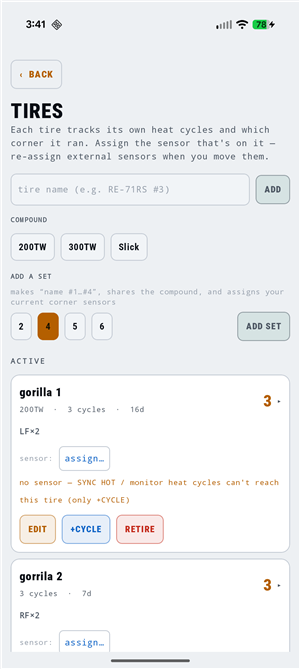 ADD SET builds “name #1…#4” in one tap and binds the sensors currently on your corners.
Cycles log themselves three ways — the background monitor spots the on-track heat-up/cool-down, a hot pressure sync counts one, or you tap +CYCLE manually (as many times as you need to back-fill a known history). The automatic paths dedupe within a 10-minute window so one session never double-counts, and the corner is recorded on every cycle, so a tire’s card reads LF×2 RF×2 after a weekend of rotations without you telling it anything.
The trick that makes it work: a TPMS sensor is a movable pointer to a tire. Internal sensors stay with their tire forever; external screw-ons get re-pointed when they move. The app resolves corner → valve-stem color → sensor → tire live, every time.
The paint-marker color system
I color-code valve stems with Posca PC-3M markers, so the app’s color list now is my marker kit — fourteen presets matched to the actual marker pigments (316 red, 311 blue, 308 purple, 324 black…), plus a + SPLIT picker for two-tone stems like the Red/White spare.
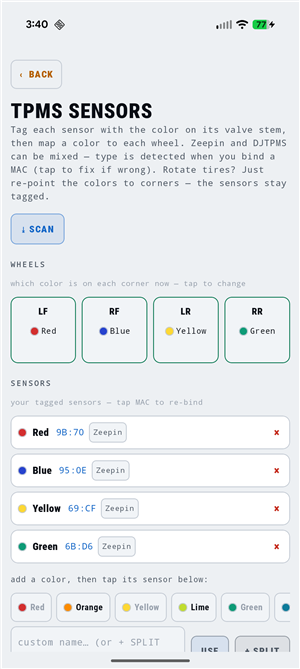 Tag a sensor once, map colors to corners. Rotation = re-point the colors, done.
Tesla sensor support is gone (I don’t run them; that rabbit hole got its own post) — replaced by DJTPMS support alongside Zeepin, and the protocol is now stored per sensor, so a car can mix brands corner-to-corner. The decode auto-detects when you bind.
Background monitor with real charts
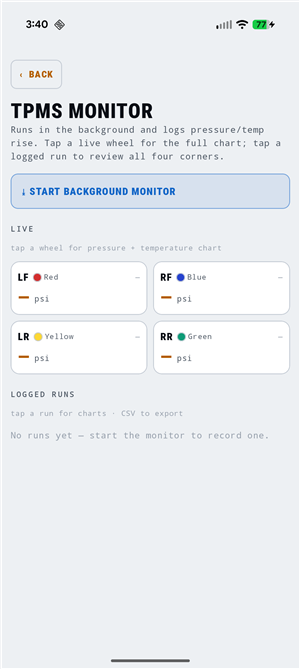 Color-tagged live corners; tap any wheel or logged run for dual-axis charts.
MON logs psi/°F all day from a foreground service, ported from my standalone monitor app experiments. New since then: tap-through charts (pressure + temperature, dual axis, min/max marked) with a real elapsed-time axis, CSV export per run, and it now doubles as the heat-cycle detector.
Sessions got smarter
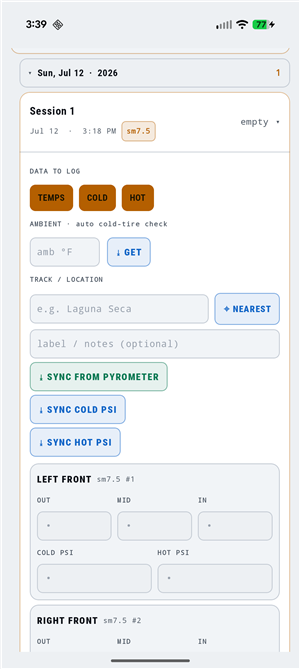 Each corner block shows which inventory tire is on it — resolved through the sensor chain.
- The log is grouped track → day → session, collapsible, because six readings a day made a flat list useless.
- New sessions inherit the last session’s whole setup, auto-number themselves, and auto-fill the tire set from what’s mounted.
- The track name fills itself from a bundled offline list of ~1,900 circuits (Wikidata), with an OpenStreetMap fallback when there’s signal.
- Set one hot target per tire model and the app derives bleed amounts and a predicted cold start pressure from your own logged cold→hot rise — ambient-aware, so morning and afternoon predictions don’t pollute each other.
- A tread heatmap on every card makes camber/pressure asymmetry visible at a glance.
Quality of life
A pile of small stuff from dogfooding at NCCAR: every destructive action (sessions, runs, tires, calibrations, checklists, car reset) now confirms first; blank corners show a dash instead of a fake 0.0%; the settings menu split app-wide items from per-car targets; theme follows the system if you want; and the Daylight palette stays the default because pit lanes are bright.
Full setup and workflow docs are in the user manual. Play Store release is still the plan once the listing paperwork is done.