Read this first — it’s beta, and this page is the current one
The current page for R53 Logger - Flasher is here, with the Stage 1 flash, new screenshots and the sign-up steps. This post is kept for the record.
The app is beta. It reads and writes a twenty-year-old engine controller on a car you presumably like. It has been developed against a small number of cars, and a flash that stops part-way leaves an ECU that will not start until it is written again. Always take a backup, always run the car off a battery charger, and keep a desktop OBD recovery path available.
Lean cruise is VERY, VERY beta. It leans the mixture at steady cruise. It is the one option that changes fuelling while you are driving on it rather than at wide-open throttle, and it has had the least testing of anything in the list. If you are not prepared to watch AFRs and back it out, leave it off.
Last updated 2026-10-11. It’s on Google Play now, no sign-up. See Want to try it? at the bottom.
What it costs
Everything is a one-off in-app purchase — no subscription.
| App unlock | $25 — logging, graphs, 3D AFR, wideband, diagnostics, backup |
| Flash unlock | $50 — write to the ECU, plus the at-write tune options |
| Stage 1 flash | $50 — MINI’s own JCW and GP1 software, plus the stock US Cooper S image (details) |
| Prepared facelift ECU | $275 — see below |
Backup is part of the app unlock. You can read and keep a full 512 KB copy of your own ECU without buying the flash unlock.
It’s finished
Mini R53 Logger - Flasher — the Android app I’ve been building so I can log what the supercharged W11 is doing and flash a facelift ECU from the same phone — is feature-complete, and I’m loading it onto the Google Play Store.
Anyone can install it from Google Play now.
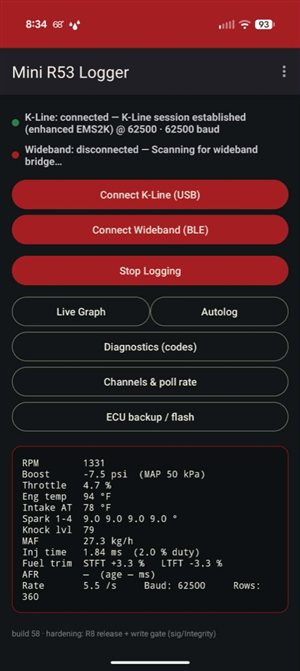 Plug in, hit connect, and the car streams live: RPM, boost, temps, spark, knock, fuel trims, injection — the works.
What you get
Same idea as the earlier Logger - Flasher writeup, now finished:
- Live engine data fast enough for a real pull — boost, throttle, temps, per-cylinder spark, knock, MAF, injector duty, short/long fuel trim
- Wideband AFR over Bluetooth, merged into the same time-aligned CSV
- Autolog — arms on WOT, keeps the pull through gear changes, saves each run as its own file
- Live graph with channel toggles, fixed ranges, and a redline marker on the RPM trace — 30-second window, export straight to datazap.me
- 3D AFR tuning graph — 3D surface plot of actual AFR vs target across RPM and load, ignoring DFCO and tip-out leans. Play back any log, scrub with 2-finger pan, export CSV or open in Datazap
- Wideband calibration — ESP32 bridge streams 0–5 V sensor output; pick resistor divider (easiest) or ADS1115 I2C (more accurate), then Innovate / AEM / custom curve. No laptop, no serial terminal — configured and saved from the phone
- Diagnostics — read and clear fault codes with R53-specific notes (chassis modules stay on BMW hex titles — no fake SAE crosswalk)
- Channels & poll rate — turn off blocks you don’t care about so the ones you do watch update faster
- ECU backup / flash — read a full 512 KB backup, send it to your tuner, and (carefully) write a tuner BIN back — see the supported-ECU table below
- Flash options — before a quick write, optionally layer on pops, injector size, redline, throttle-pedal map, idle RPM (manual, cold + warm), cooling-fan kick-on including an even-earlier 200 / 220 °F preset, and lean cruise (very beta — see the warning at the top)
There’s a separate companion app for module coding (BC1, EMS, airbag, …) — see R53 Coding.
Everything records to plain CSV and shares straight into datazap.me. Numbers were cross-checked against professional BMW diagnostic tools on a running engine.
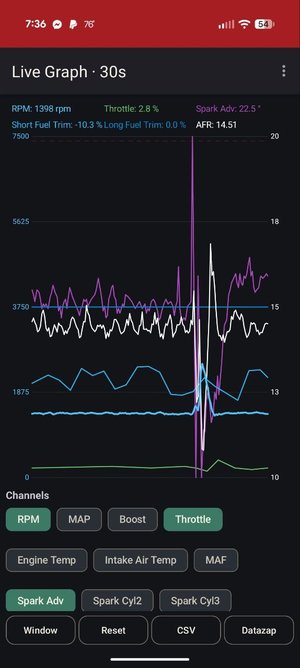 Live graph — 30s rolling window. Toggle the channels you care about; export CSV or open in datazap from the bottom.
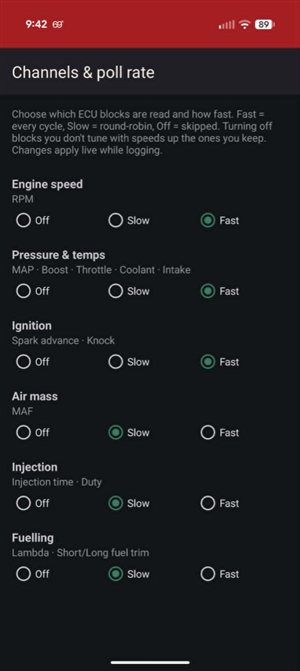 Fast / Slow / Off per ECU block — drop what you don’t tune with and the rest gets snappier.
ECU backup and flash
Which ECUs can be written (updated September 2026 — this used to be facelift-only, and it isn’t any more):
| Software the app reports | Write | Tune options |
|---|---|---|
740A0 / 740P10 — facelift, silver cover |
yes | yes |
740J10 — pre-facelift conversion |
yes | yes |
740N20, 740G00, 740R10 |
no | no |
Logging, live data, diagnostics and backup work on any R53 EMS2000, silver cover or black. That has never been the restricted part.
The app reads the software version off your own ECU and off the BIN before it does anything, and refuses to write a family it does not have verified table addresses for — it will not guess. If it sees software it doesn’t know, it offers to email me the file so support can be added.
A note on the pre-facelift family, because it cost a customer two days: those ECUs take a calibration one block shorter than the facelift ones. The app now knows that. If you flashed a pre-facelift box with a build before 451 and it stopped around 96%, write it again with a current build — the calibration was complete, it was the finishing step that never ran.
Stage 1 flash — OEM JCW and GP1
MINI was nice enough to basically give us a Stage 1 flash. The John Cooper Works and GP1 calibrations are the factory’s own tunes for an R53 with a smaller supercharger pulley and a freer exhaust, which is how most of these cars are built by the time anyone wants a tune. In the app they’re the JCW and GP1 buttons on the flash screen.
- It’s OEM software — MINI’s calibration, flashed as the factory wrote it. Not my tune, not a third-party map. The flash options below can still be layered on top.
- It needs the JCW / GP 380 cc injectors. The stock Cooper S 330s can’t supply the fuel these calibrations ask for. Bigger than 380? Set the injector size option to match.
- It’s for a car with a pulley and an exhaust or header. That’s what it was calibrated around; on a bone-stock car it’s the wrong tune.
The US S button is the stock Cooper S software, for putting a car back.
Backup is read-only and safe. Write is dangerous — key on / engine off, keep the car on a battery charger, and keep a desktop OBD recovery path ready. The app checks the tune before writing (and can auto-fix checksum / layout issues). Pick a 512 KB BIN, or load the Stage 1 flash (JCW / GP1) or stock US S as a base, then either a quick write (calibration region, ~60 KB) or a full write (512 KB).
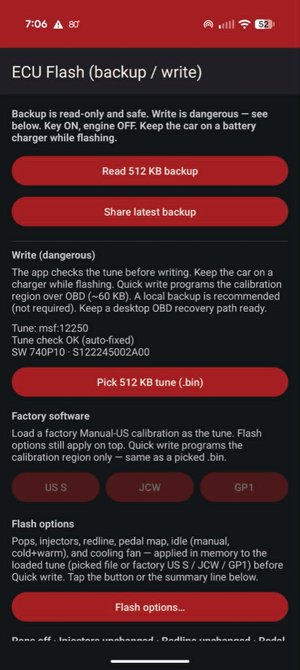 Flash screen — Read backup, pick a BIN, load US S / JCW / GP1, then Flash options before Quick or Full write.
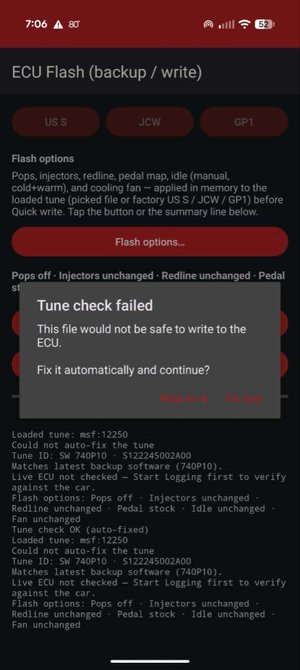 If the BIN wouldn’t be safe to write, you get a clear choice: Keep as-is or Fix tune and continue.
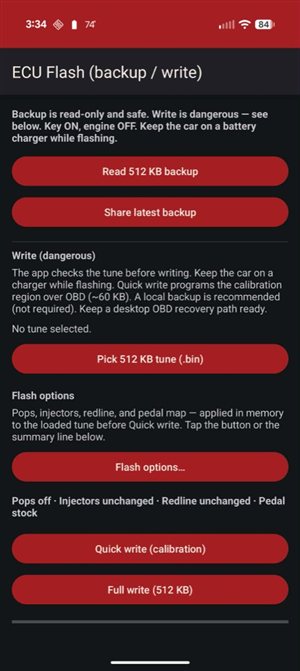 Earlier flash layout — same path: backup, options, write. Silver-cover facelift ECUs only.
Facelift ECU for sale — $275
Don’t have a silver-cover facelift box? I sell them ready to drop in:
- VIN swap to your car
- Immobilizer delete so it runs without wrestling the factory EWS pairing
- $275 for the prepared ECU
Shipping billed at actual cost. Email me your year/model and VIN and I’ll confirm fitment and quote shipping.
→ matt@geekopolis.com — subject something like “R53 facelift ECU”.
Track / off-road use only; no warranty against engine or ECU damage — you’re buying a prepared control unit for a 20-year-old supercharged car.
Flash options (at write time)
Before a quick write, you can tweak the loaded tune in memory — no separate desktop editor required for the common bits. Toggle what you want; Save turns chili-red when something changed.
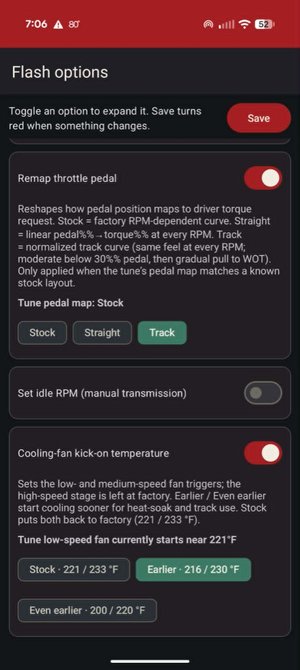 Pedal map (Stock / Straight / Track) and cooling fan — Stock, Earlier 216/230 °F, or Even earlier 200/220 °F.
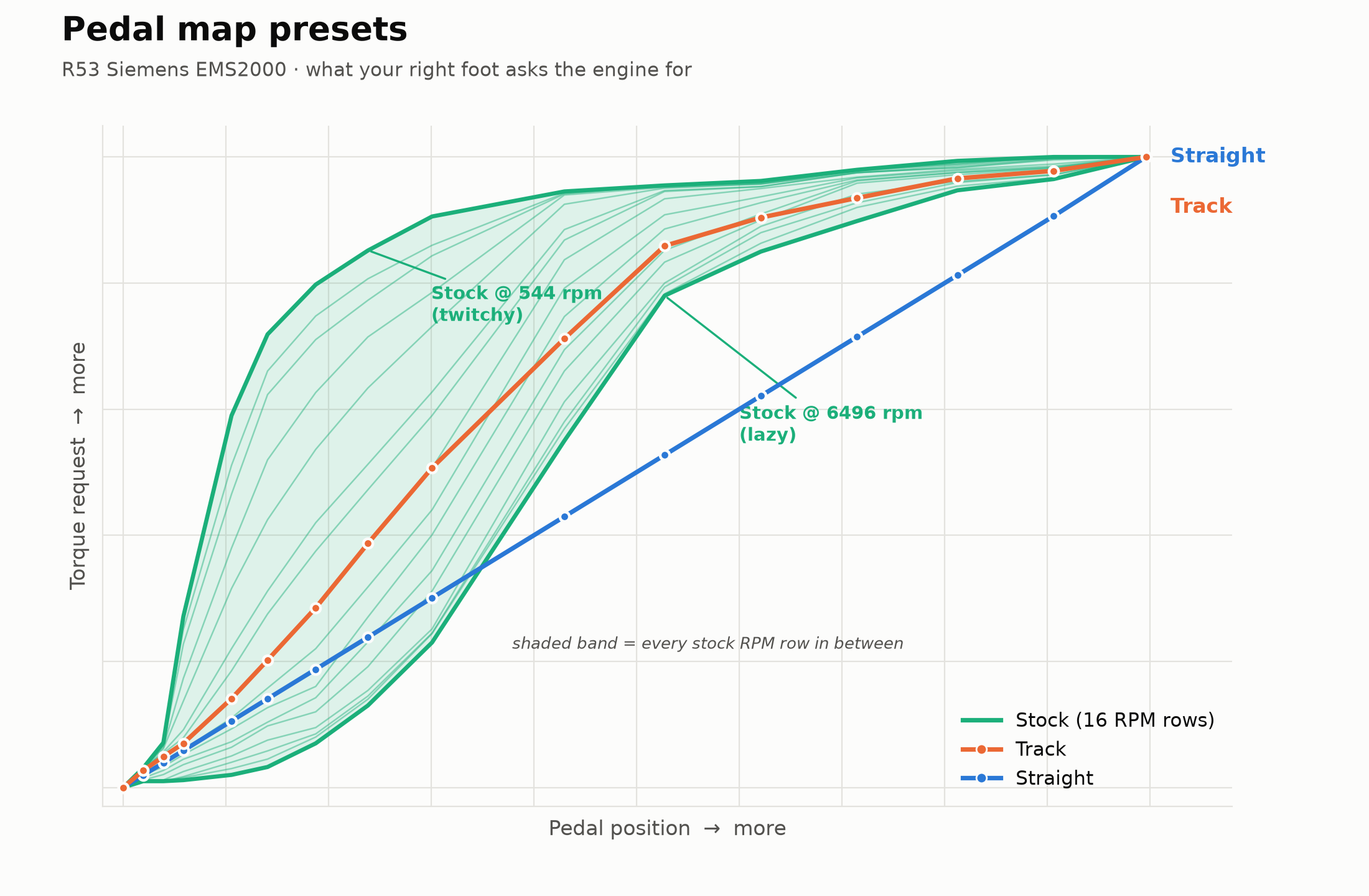 The three pedal presets, plotted from the actual table the app writes. Stock isn’t one curve — it’s sixteen, one per RPM row, so a quarter of pedal travel asks for 85% torque just off idle and 13% at 6500. Track and Straight put the same curve on every row, so pedal position means the same thing wherever the tach is sitting. Straight is exactly that: torque equals pedal, 1:1. WOT is 100% on all three.
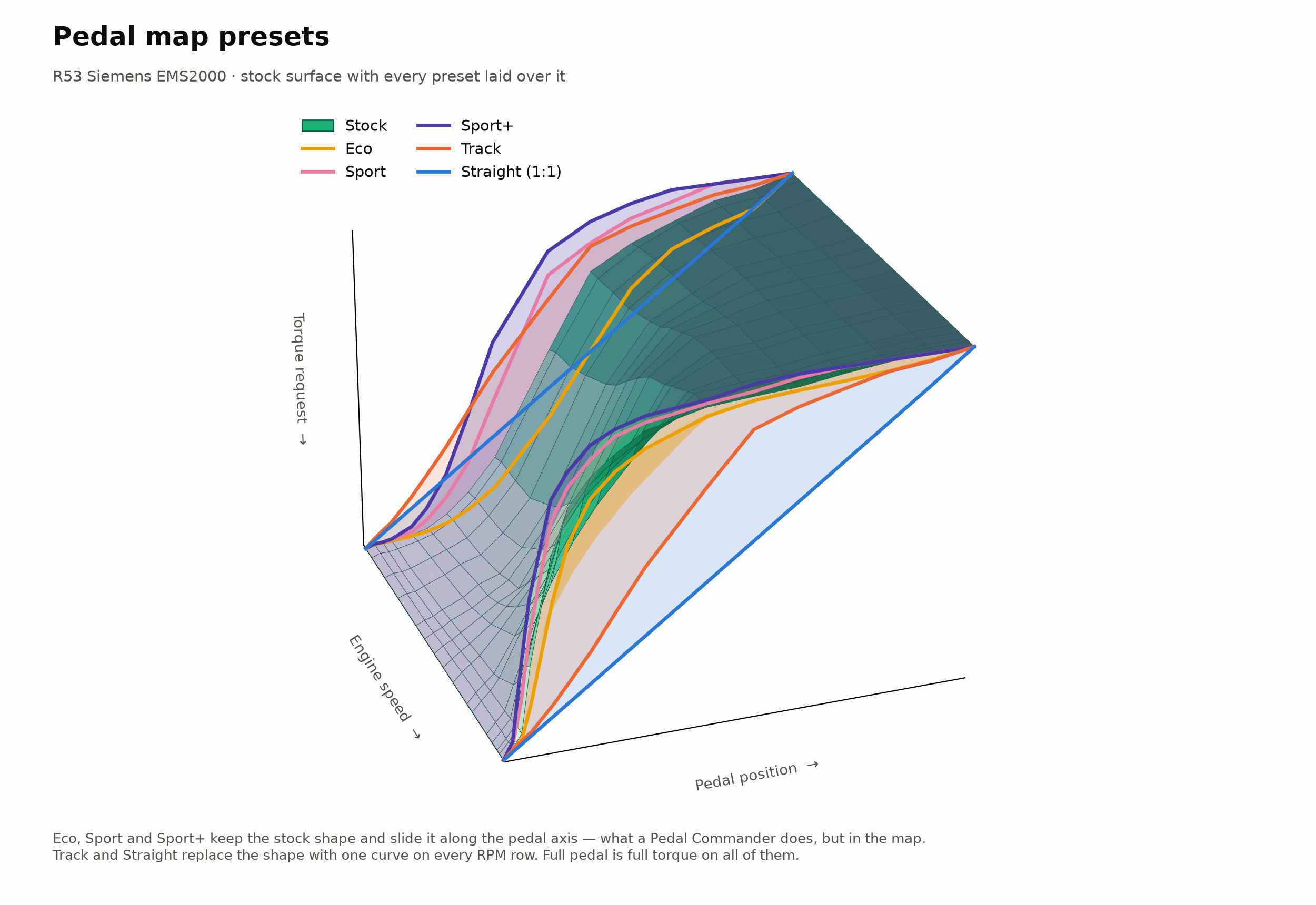 The same thing in three dimensions, now with the three new presets. Stock is the green surface: steep at low RPM, lazy at high RPM. Eco, Sport and Sport+ keep that shape and slide it along the pedal axis. Track and Straight throw the shape away and put one curve on every RPM row.
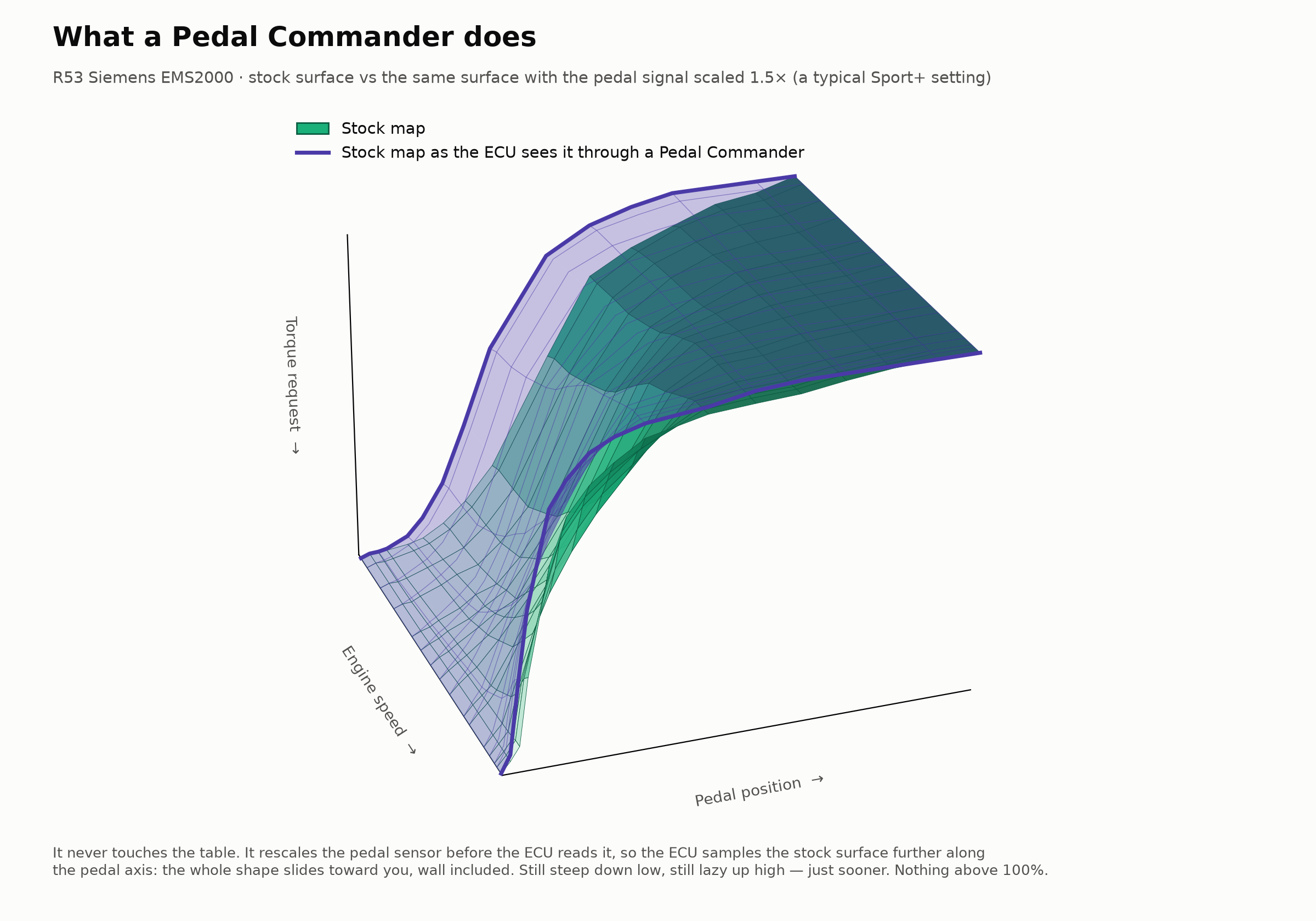 For comparison: a Pedal Commander never touches the table. It rescales the pedal sensor before the ECU reads it, so the ECU samples the stock surface further along the pedal axis — the whole shape slides toward you, twitchy wall included. Sport and Sport+ in the app do the same job in the map itself, and update the ECU’s torque monitor alongside so the shifted request can’t set a fault.
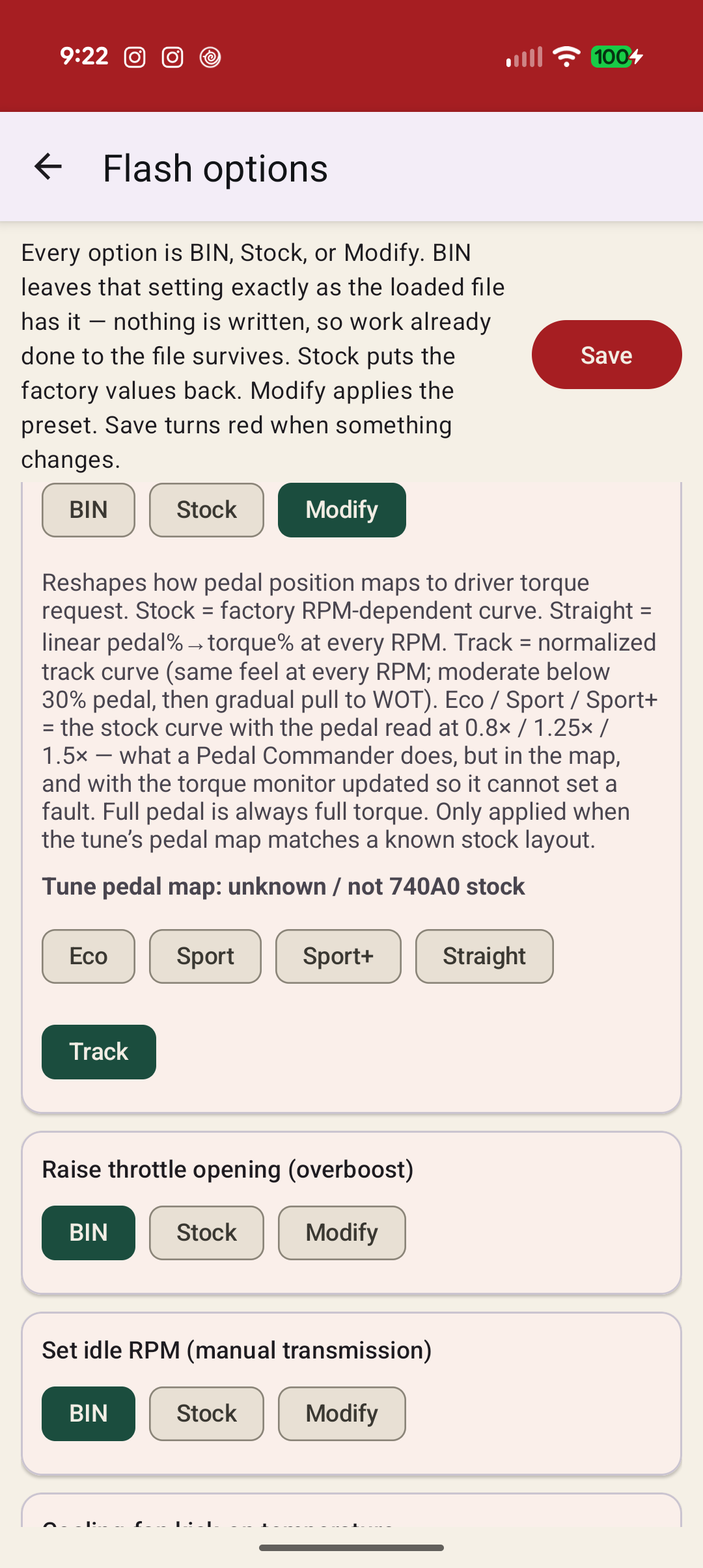 The pedal card on Modify: Eco, Sport, Sport+, Straight and Track. Stock is the row above it.
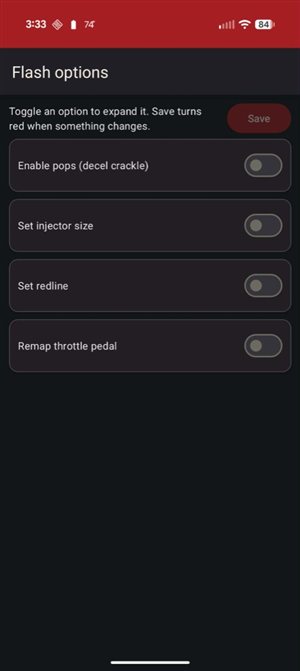 Same options list — pops, injectors, redline, pedal, idle, and fan all live here.
- Enable pops (decel crackle) — with an aggressiveness slider from stock to max
- Set injector size — for when you’ve upsized injectors (stock S / JCW sizes and common bigger ones)
- Set redline — raises the per-gear rev limit. The R53’s limiter is a fuel cut, not a throttle cut: it trims torque by shutting injectors in a rotating pattern, then cuts all four a fixed step above the limit. That step is an offset, so it moves up with the limit and there is nothing else to set
- Remap throttle pedal — Stock, Eco, Sport, Sport+ (the stock curve read at 0.8× / 1.25× / 1.5× pedal — what a Pedal Commander does, but in the map), Straight (a true 1:1 line), or Track (one normalised curve at every RPM). Every preset also writes the ECU’s torque-monitor table to match, so a remapped pedal can’t set P1689
- Set idle RPM (manual transmission) — manuals only. Writes the same target across cold/startup and warm idle on normal idle, A/C on, and coasting back to idle so it stays consistent. Stock restores factory cold (1250) plus the warm schedules; raised presets for mild / street / race-cam / big-cam. Automatic cars: leave this off.
- Cooling-fan kick-on temperature — low and medium speeds only (high stays factory). Shown in °F. Stock 221 / 233 °F; Earlier 216 / 230 °F; Even earlier 200 / 220 °F for heat-soak / track use.
- Lean cruise — VERY, VERY beta. Leans the mixture at steady-state cruise for economy. Unlike everything else here it changes fuelling in the part of the map you drive on every day, and it is the least-tested option in the app. Watch your AFRs, and turn it off at the first thing you don’t like.
The summary line on the flash screen shows what’s armed (Pops off · Injectors unchanged · Idle unchanged · Fan unchanged · …). The app auto-checks (and can auto-fix) the tune whenever options change the image, and again before write.
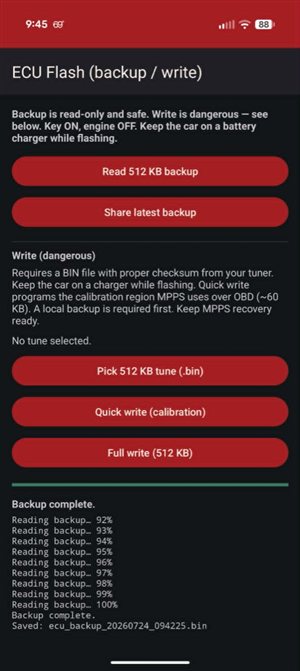 Backup complete — file saved on the phone, ready to send to your tuner or keep as your recovery copy.
3D AFR Tuning Graph
The live graph shows what’s happening right now, but tuning fuel means understanding what already happened — every cell the engine visited, and how far off target it ran. The 3D tuning graph plots actual AFR minus target as a surface across RPM and load, so a peak in the red means the car went lean right where you need the fuel.
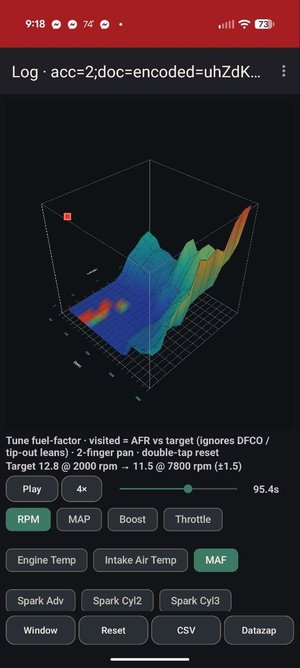 Surface plot: visited cells coloured by AFR error. Green is on-target; red/orange means lean — exactly where the fuel table needs work.
The graph ignores DFCO and tip-out leans so you’re looking at real combustion events, not decel artifacts. A target line sits at the bottom — e.g. 12.8 at 2,000 rpm tapering to 11.5 at 7,800 rpm (±1.5) — and the surface shows every cell’s deviation from that ramp.
- 2-finger pan to scrub through the log; double-tap resets the view
- Play / 4× speed with elapsed time — drop in anywhere and watch the surface build
- Channel selector — RPM, MAP, Boost, Throttle, MAF, Engine Temp, Intake Air Temp, Spark Adv (with per-cylinder), so you can swap axes or narrow to what matters
- Window / Reset / CSV / Datazap along the bottom — same export pipeline as the live graph
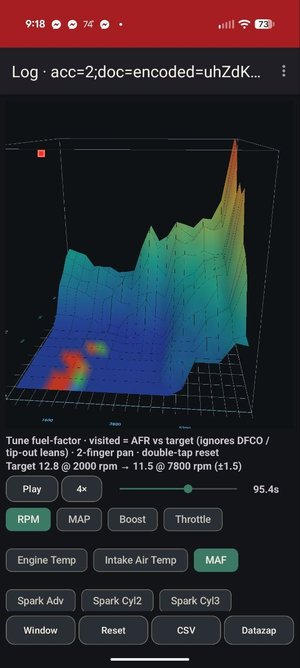 Rotate and zoom — the surface makes it obvious which RPM/load cells consistently run off-target.
Wideband calibration
The wideband doesn’t just show up — you have to tell the app which sensor is wired to the bridge and what voltage curve it follows. The calibration screen handles all of it in one place, no laptop required.
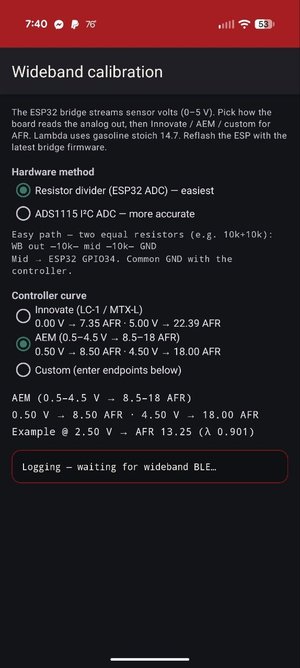 Pick the hardware path (resistor divider or ADS1115), then the controller curve — Innovate, AEM, or custom endpoints.
Hardware method — how the ESP32 bridge reads the sensor’s 0–5 V analog output:
- Resistor divider (ESP32 ADC) — easiest: two equal resistors (e.g. 10k+10k) form a divider — wideband out → 10k → mid → 10k → GND, mid to GPIO34. Common ground with the controller. Works with nothing but the ESP32.
- ADS1115 I2C ADC — more accurate: 16-bit external ADC over I²C for when you want the last tenth of an AFR point.
Controller curve — translate volts to AFR:
- Innovate LC-1 / MTX-L — 0.00 V → 7.35 AFR, 5.00 V → 22.39 AFR
- AEM (0.5–4.5 V → 8.5–18 AFR) — the most common aftermarket curve
- Custom — enter your own voltage/AFR endpoints for anything else
The bridge firmware is open source (ESP32, streams sensor volts over BLE). Reflash it once, then calibrate and save from the phone — the app remembers your settings across sessions.
The app defaults to the AEM curve. If you’re running an Innovate or something custom, set it once and it sticks.
Want to try it?
R53 Logger - Flasher is on Google Play for everyone now, so there’s no test group to join. Install it from Play, not a sideloaded APK, or purchases and unlocks won’t work.
Questions or ECU quotes: matt@geekopolis.com or @mattryan6729.
If you give it a weekend on the car, tell me what breaks and what’s missing.